Use all AI tools.
Leak nothing.
Sequirly is the AI data safety layer that runs quietly in the background. It catches client data, credentials, and PII before your team sends them to ChatGPT, Claude, or Gemini. No security team required.
Try Sequirly with your own prompt
Runs entirely in your browser — nothing is sent anywhere · taste of the real 50+ pattern engine
You are one paste away from a major data leaks.
Your team is already using AI for client work. Now the question is what ends up inside the prompt: client contact lists, campaign data, contracts, credentials — all sent to a server you don't control.
Imagine explaining why your client's customer list is sitting on a server you don't control.
How it works in three easy steps.
Your team doesn’t change how they work. Sequirly changes what can go wrong.
Install in 2 minutes
Add Sequirly to Chrome, Edge, or Brave. No security department, no IT ticket, no network configuration.
Use AI normally
Your team keeps using ChatGPT, Claude, and Gemini exactly as they already do. Sequirly runs quietly in the background.
Sensitive data gets caught
Before an API key, a client’s contact list, or a database URL gets sent, Sequirly flags it — every time, no matter who typed it.
Protection without surveillance
You get a complete audit log, ready for SOC 2 reviews, GDPR compliance checks, or internal security reviews, without ever seeing what your team typed.
- Category of detected data (API, PII, Credentials)
- AI tool that your team regularly use (ChatGPT, Claude, or Gemini)
- Timestamp and team member involved
- The actual text of the prompt or document
- What the team member was working on
- Any part of the message that was sent
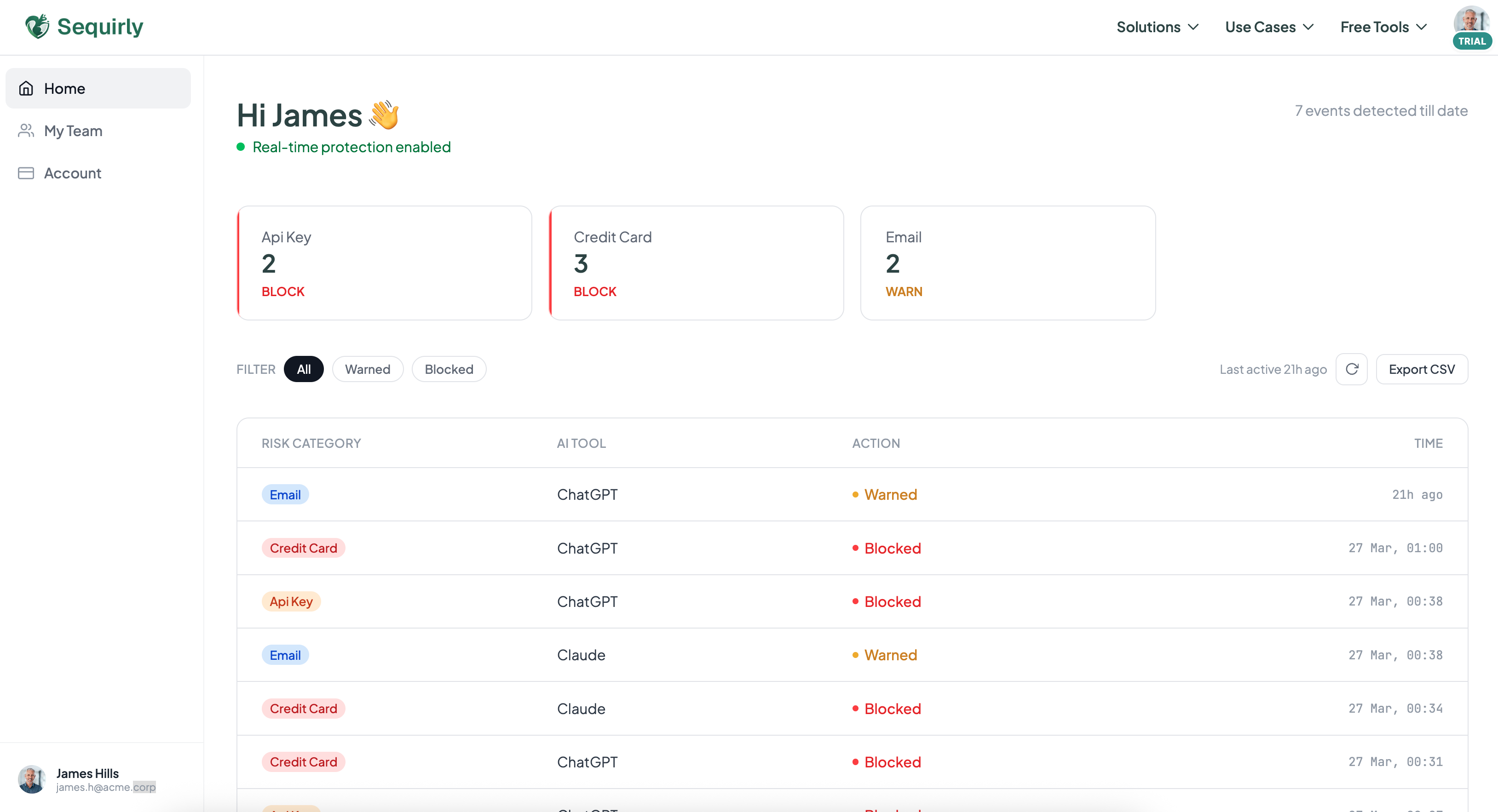
If it’s sensitive, Sequirly catches it.
50+ detection patterns, all running locally in your browser.
Client PII
Names, emails, phone numbers — with smart filtering for real personal data.
Document uploads
PDFs, spreadsheets, CSVs — scanned before an upload completes.
Financial data
Retainer figures, budgets, and bank details flagged in any prompt.
Contracts & IDs
NDAs, SSNs, passport numbers, and license numbers flagged on sight.
What our users are saying.
“As the founder of FourCasa, privacy and data security are always top priorities in our development workflow. Sequirly has added an extra layer of confidence for our team. Every month, we now review our audit log to verify whether there has been any sensitive data shared with AI tools.”
Nischal L.
Founder, FourCasa
“We were doing AI security training and people were still pasting company data into ChatGPT. Sequirly prevented those incidents and also gave me visibility into how people are actually using AI across the team.”
Bhumika S.
Head of Human Resources, Dev Outsourcing Agency
Try it free. Tell us what you think.
No credit card. Your team is protected the moment you add Sequirly — and we’ll be on the other end of your first piece of feedback.