How Sequirly stops data leaks before they happen
Sequirly is a browser extension that catches sensitive data before your team sends it to ChatGPT, Claude, or Gemini. All scanning is local. No data reaches Sequirly's servers.
Three steps. Zero workflow changes.
Your team does not change how they work. Sequirly changes what can go wrong.
Install in under 2 minutes
Add Sequirly to Chrome, Edge, or Brave from the Extension Store. You set up a team workspace in the admin dashboard, invite your team members, and they each install the extension.
Your team works normally
Your team keeps using ChatGPT, Claude, and Gemini exactly as they always have. When a team member types or pastes text into a prompt field, or uploads a document, Sequirly scans it locally. They will not notice it.
ChatGPT
AI Assistant
Caught before it's sent
When Sequirly detects sensitive data: an API key, a client's email list, a credit card number, a database connection string, it shows a clear, non-intrusive warning before the message is sent.
What Sequirly Catches
18 detection types. Two severity levels. All caught before the send button.
Critical (Red)
API Keys & Tokens
AWS access keys, OpenAI keys, Stripe keys, GitHub personal access tokens, and Slack tokens.
Private Keys & .env Secrets
SSH private keys, RSA keys, EC keys, and patterns in .env files: SECRET_KEY=, DATABASE_URL=, and more.
Credit Cards
Card numbers that pass the Luhn checksum algorithm. Covers all major card formats.
Warning (Amber)
Customer PII
Names, emails, and phone numbers with smart filtering - skips obvious placeholders (test@example.com, abc@email.com).
Passwords
Explicit patterns like password: [value], password=[value], pwd=[value]. Requires at least 8 characters to avoid false positives.
High-Entropy Tokens
Catches API tokens and session values that do not match a named pattern but structurally look like credentials.
Protection Without Surveillance
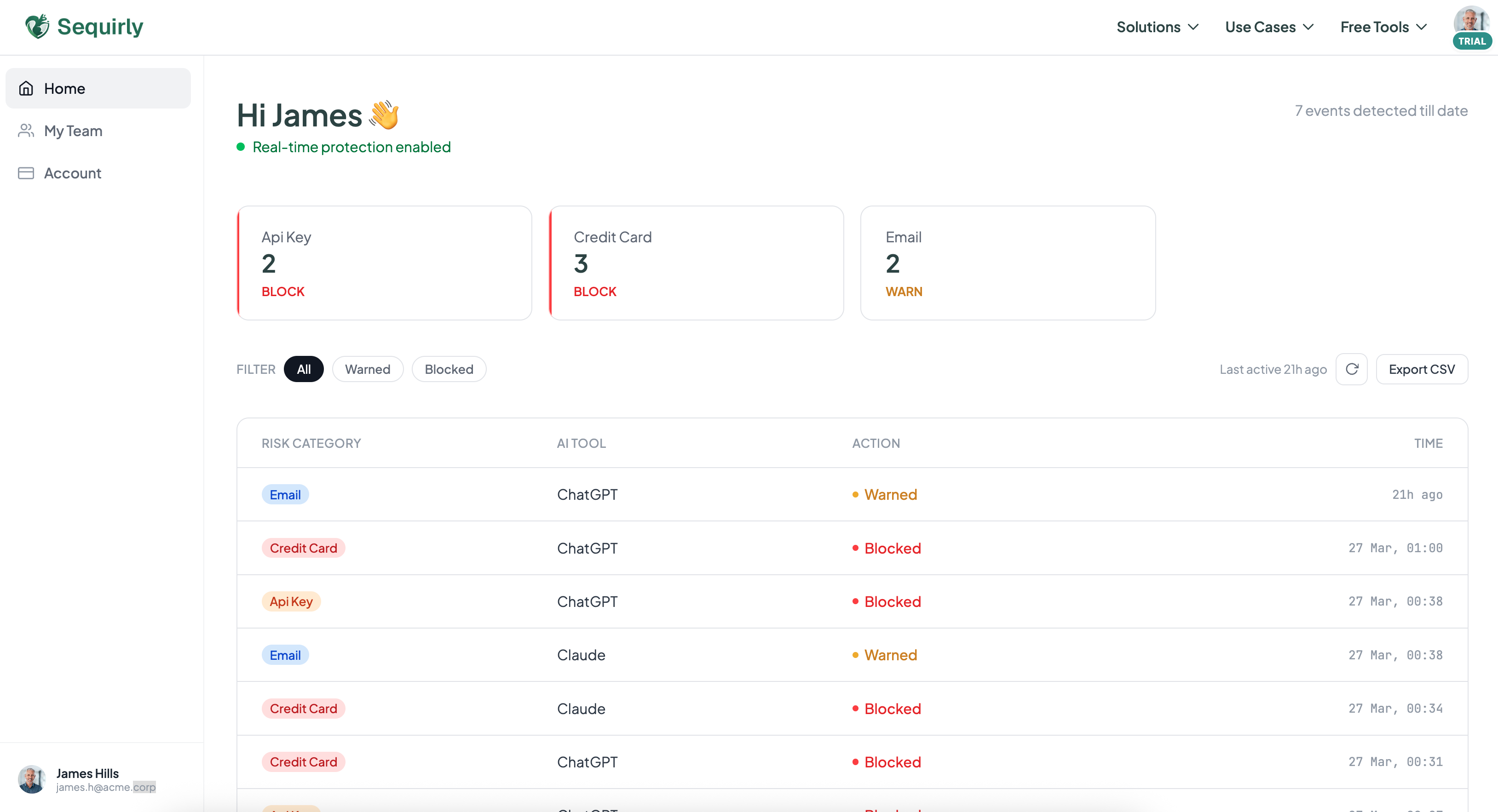
Admins see which category leaked, not what was written. Your employees keep their privacy; you keep your audit trail.
What Admins See
- Category of detected data (API, PII, Credentials)
- AI tool the detection happened in (ChatGPT, Claude, or Gemini)
- Timestamp and team member involved
What Admins NEVER See
- The actual text of the prompt or document
- What the team member was working on
- Any part of the message that was sent
You get a complete audit log, ready for SOC 2 reviews, GDPR compliance checks, or internal security reviews, without ever seeing what your team typed. That is not a limitation. It is the design.
Local-First Architecture
We never see your team's prompts. We built the product so that was never possible.
Here is how the architecture works, in plain language.
Detection stays on the device
When your team member types or pastes text into ChatGPT, that text lives in the browser's memory. Sequirly reads it directly from the input field — on the device, before the browser sends anything to ChatGPT's servers. The detection engine runs locally.
Only metadata is logged
The only information that ever leaves the device is a detection event — "API key detected. Action: warning shown." Not the key itself. Not the surrounding text. Just the event metadata.
No compromise on speed
Detection runs in under 50ms. Your team will not notice any performance lag. Sequirly works invisibly in the background until it catches something.