
Your team uses AI tools every day. They write emails using ChatGPT, debug code using Claude, and analyze data using Gemini.
However, every one of those AI interactions is a potential data leak. And most teams don't have any AI protection in place. In fact, only 36% of organizations have AI security policies.
The rest are flying blind.
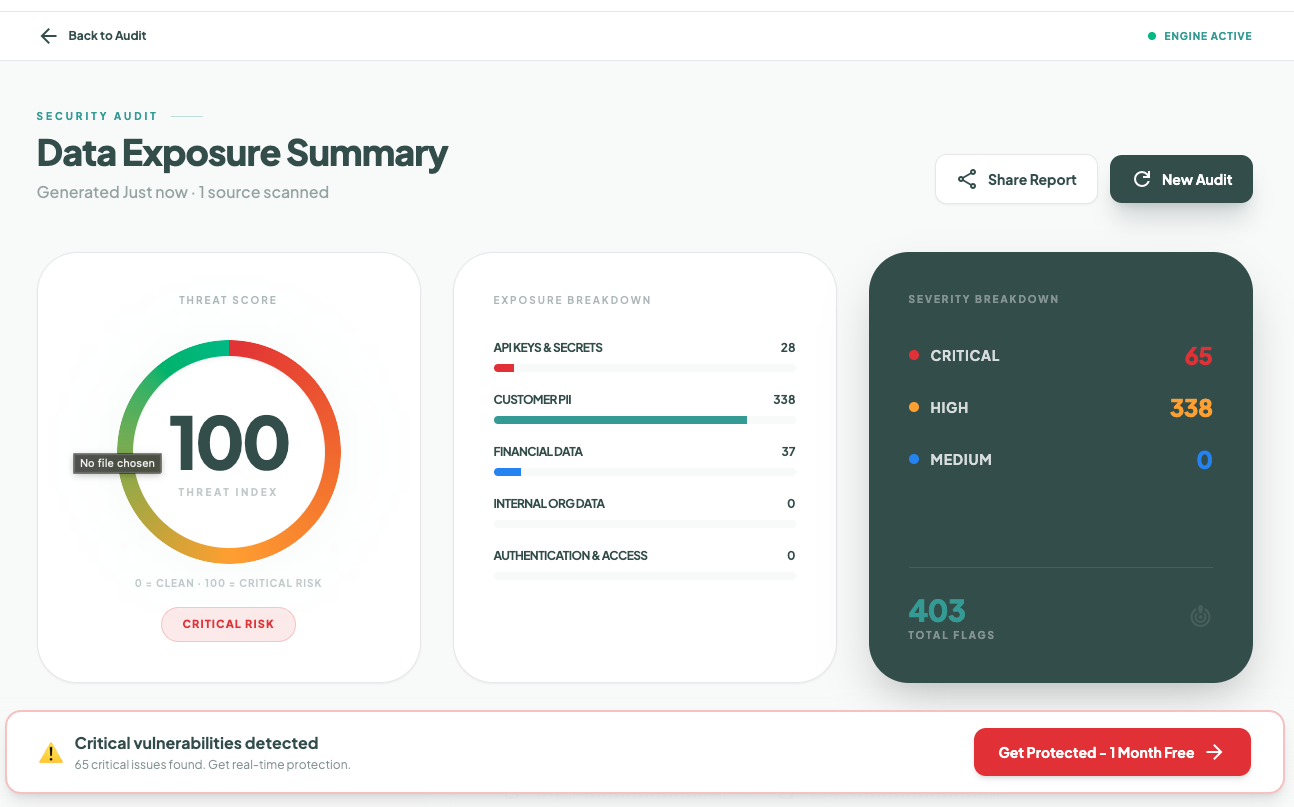
When I started caring about AI security, I looked back at my own AI usage over the past year. I realized I had no idea what I'd actually shared. I then ran a quick audit using Sequirly AI Security Scanner.
The results were surprising.
So, I decided to build a guide that covers everything you need to protect your team's AI usage. And if your team is under 50 people, you probably don't have a dedicated security team. So this guide is a must read for you.
This includes steps that you can start implementing this week.
The Real Risks Your Team Faces With AI
Before you can protect anything, you need to understand what you're actually protecting against.
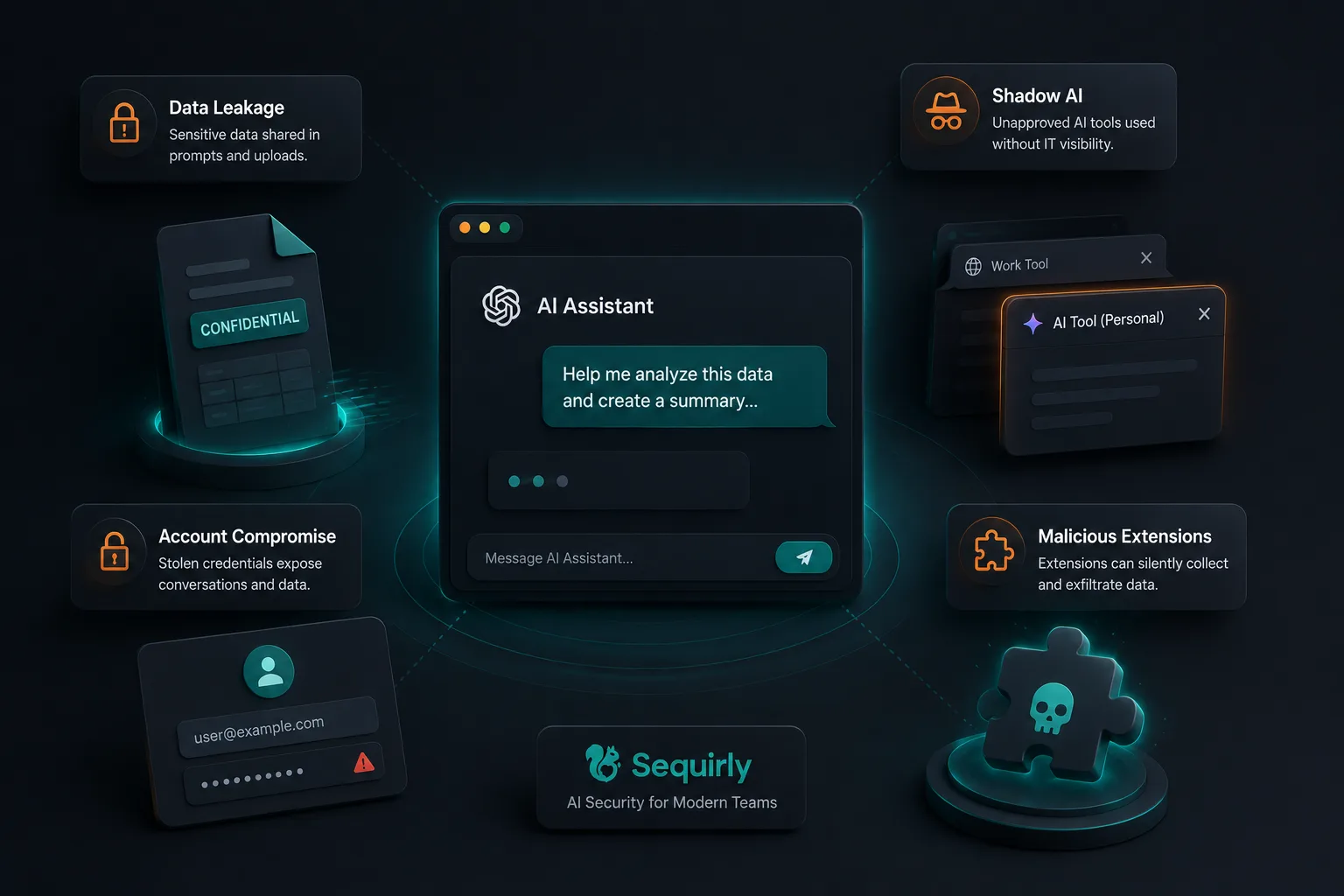
Most articles about AI security risks list abstract threats and technical jargon. But for a team of 15, 30, or 50 people, the risks are very concrete. Here are the four that actually matter.
1. Data Leakage Through Prompts and Uploads
This is the biggest risk. And the most common.
Your team pastes data into AI tools, and that data leaves your control. It's not a rare event. 39.7% of all AI interactions involve sensitive data. That's the average across thousands of companies, not a worst-case number.
Here's what it looks like on a regular Tuesday afternoon:
- A developer is debugging a production issue. They paste a code block into ChatGPT without noticing there's a live database connection string embedded in it. The AI gives them a fix in 10 seconds. The credential is now in OpenAI's system.
- A marketer needs to find patterns in customer behavior. They export a CRM list with names, emails, and purchase history, and drop it into Claude. "Analyze this data and find the top segments." The AI delivers a great analysis. The client's entire customer database just left the building.
- An account manager is behind on a proposal. They upload the full client brief, complete with confidential pricing and strategy notes, into an AI tool to "help me write the executive summary." Done in two minutes. The client's unreleased plans are now outside their control.
None of these people is being careless. They're being productive. And that's exactly the problem.
AI tools are designed to eliminate friction. There's no "Are you sure?" dialog. No pause between pasting and sending. When you're in flow, and the deadline is in two hours, your brain doesn't flag the risk.
By default, most free-tier AI tools can use your inputs to improve their models. So that data doesn't just pass through. It could end up influencing future outputs for other users.
2. Shadow AI
Your team is using AI tools you don't know about.
- 78% of workers bring their own AI tools to work. Not the ones your company approved. Their own personal subscriptions, free accounts, and random browser extensions.
- 32.3% of ChatGPT usage happens through personal accounts. That means about a third of your team's AI interactions are completely invisible to you. No company logging or data policies applied.
And what was shared or where it went? No idea.
I talked to an agency founder recently who assumed his team was using "maybe ChatGPT and Claude." When he actually asked, he found out they were using seven different AI tools, four of which he'd never heard of. And guess what, personal accounts on all of them.
The cost is real. Organizations with high shadow AI usage reported $670,000 more in breach costs compared to those with low or no shadow AI. And one in five organizations that experienced an AI-related breach traced it back to shadow AI.
You can't protect against risks you can't see.
3. Account Compromise and Credential Theft
Your team's AI accounts are targets.
Over 225,000 ChatGPT credentials were found on the dark web in 2024-2025, stolen by infostealer malware. If someone gets into your team member's ChatGPT account, they get access to every conversation, every document uploaded, and every prompt ever sent.
For teams that handle client work, that's months of client data sitting in chat histories.
This isn't just about passwords. The McDonald's McHire breach in July 2025 exposed 64 million job applicants' data because an AI-powered platform used "123456" as an admin password. Weak credentials on AI-connected systems are an open door.
4. Malicious Browser Extensions
This one catches most people off guard.
In July 2025, the Urban VPN Proxy Chrome extension silently added AI data harvesting to its code through a routine update.
Over 6 million users were affected.
The extension captured conversations with ChatGPT, Claude, Gemini, and other AI platforms, then sent them to third-party data brokers.
But, the most concerning part is that the extension had a "Featured" badge from Google, meaning it had passed manual review.
Users who installed it before the update never saw a consent prompt. The harvesting was enabled by default with no toggle to disable it. The only option was to uninstall.
Building a Simple AI Usage Policy
You don't need a 40-page document. You need a one-pager that your team will actually read and follow.
Most policy templates online are built for enterprises with legal departments and compliance teams.
If you're a 20-person team, a 15-page policy document is going to sit in a Google Drive folder that nobody opens.
You need something short enough that a new hire can read it in five minutes and know exactly what to do.
Here's what to include.
Section 1: Approved Tools
List the specific AI tools your team is allowed to use. Be precise. "ChatGPT Team" is a different product from "ChatGPT Free."
The paid versions typically don't train on your data. The free ones usually do.
A simple approved list:
- Approved: ChatGPT Team/Enterprise, Claude Pro/Team, GitHub Copilot Business
- Not approved: Free-tier accounts, personal accounts, any AI tool not on this list
- Requires review: New AI tools someone wants to try. Have them flag it before using it for work.
The "requires review" category is important.
New AI tools appear every week. Your team will want to try them. Instead of banning experimentation, you're creating a channel for it.
Section 2: Data Classification
Your team needs to know what they can and can't share with AI tools.
"Don't share sensitive data" is too vague to be useful.
People interpret "sensitive" differently. You need specific categories.
- Never share: Client data, API keys, credentials, financial records, PII (names \+ emails \+ phone numbers in bulk), internal strategies, unreleased product plans
- Ask first: Anonymized client work, internal process docs, draft strategies with client names removed
- Go ahead: Public information, personal brainstorming, code with dummy data, rewriting your own drafts
If you've read our guide on how to prevent AI data leaks, you've seen this framework as a green/yellow/red system. Same idea, different labels.
The most important thing here is specificity.
"Client campaign performance data tied to a specific client" is a better guideline than "confidential client information."
The more specific you are, the fewer judgment calls your team has to make under pressure.
Section 3: Accountability
Decide who owns AI security on your team. For most teams under 50, this isn't a full-time role.
It's whoever already handles IT or operations, or even the team lead.
Their job is simple:
- Maintain the approved tools list
- Run a quarterly check-in (covered below)
- Be the person people ask when they're unsure
- Keep the policy updated as tools and risks change
Where to Put It
Pin the policy in Slack or Teams, or whatever tool your team lives in daily. Put it in your onboarding doc.
Here's the thing most teams get wrong: they write a policy and put it in a shared drive that nobody opens again.
If someone has to search for the policy, it doesn't exist. Pin it in the channel your team actually uses every day.
Download: One-Page AI Usage Policy Template
Get the exact template teams use to protect AI usage. No jargon, just clear rules.
Technical Safeguards You Can Set Up Today
Policy tells people what to do. Technical safeguards protect them when they forget. And they will forget, because AI tools are designed to feel like a personal notebook where sharing data is effortless.
These are the safeguards that work even when someone is in a rush at 6 pm on a Friday.
Lock Down AI Tool Privacy Settings
This is the highest-impact thing you can do, and it takes 15 minutes.
By default, most free-tier AI tools use your conversations to improve their models. That means anything your team types or uploads could influence the AI's future outputs for other users. You need to turn this off.
Here's what to change for each major tool:
ChatGPT
Claude
Review Anthropic's data usage settings. Anthropic updated its data policy in September 2025. If you didn't respond to the policy change, your settings may have defaulted to consent for data use.
Go and verify.
Google Gemini
Check "Gemini Apps Activity" in your Google account settings. Turn off conversation saving for any work involving client or internal data.
Microsoft Copilot
If you're on a business plan, review the data handling settings in your admin panel. Pay attention to which data sources Copilot can access.
You should create a simple checklist of these settings and have every team member go through it. Five minutes per person.
Do it together in a meeting if possible.
Download: AI Tool Privacy Settings Checklist
Step-by-step checklist for locking down ChatGPT, Claude, Gemini, and Copilot. Takes 15 minutes.
Enforce Paid Plans for Work Use
This is worth its own section because it's one of the most effective safeguards, and the most often overlooked.
Free AI accounts and paid AI accounts have very different data policies. ChatGPT Free can use your data to train models. ChatGPT Team and Enterprise do not. The same pattern holds across most AI tools.
If your team is using AI for client work, you should be paying for it.
The $20-30 per person per month is a fraction of what a single data incident would cost. The average AI-related breach costs organizations $4.88 million.
And when everyone is on the same paid plan, you get a single workspace with consistent settings and visibility.
No more wondering whether someone is using a personal account on the side.
Enable Two-Factor Authentication on Every AI Account
Every AI account your team uses for work should have 2FA enabled. No exceptions.
Given the 225,000+ ChatGPT credentials found on the dark web, this isn't a nice-to-have. It's the difference between a stolen password being useless and a stolen password being a full breach of your client's data.
Most AI tools support 2FA through authenticator apps. Have your team enable it this week.
Audit Browser Extensions
Your team probably has browser extensions you don't know about. After the Urban VPN incident that harvested AI conversations from 6 million users, this deserves real attention.
Do a quick audit. Ask everyone to go to their browser's extension page (chrome://extensions or the equivalent) and share what's installed. Remove anything that:
- You don't recognize
- Hasn't been updated in over a year
- Requests broad permissions like "read and change all your data on all websites"
- Claims to be an "AI assistant" or "AI privacy tool" from a publisher you can't verify
This takes 10 minutes. Make it part of the team session described in the next section.
Download: Technical Safeguards Checklist
Complete checklist covering privacy settings, 2FA, browser extensions, and quarterly reviews.

Prevent accidental data leaks to ChatGPT, Claude, and Gemini.
Sequirly scans your prompts and uploaded files before they're sent. If it finds credentials, client records, or API keys, it stops you before the request goes out.
Training Your Team Without Boring Them
You need your team to understand the risks. But you don't need a two-hour security seminar that everyone zones out of.
Here's what works.
The 30-Minute Session That Actually Sticks
Run one session. 30 minutes. Here's a breakdown:
1. Show real incidents first (10 minutes)
Walk through two real cases. Not hypotheticals. Real incidents with real consequences.
- The Urban VPN extension that silently harvested AI conversations from 6 million users through a routine update. The extension had a "Featured" badge from Google. Users had no idea their ChatGPT and Claude conversations were being sent to data brokers.
- The Chat & Ask AI app that exposed 300 million messages from 25 million users. An app with 50 million installs, giving access to ChatGPT, Claude, and Gemini, left its entire database publicly readable because of a misconfigured Firebase setup.
- The Mexican government breach where a hacker used Claude and ChatGPT to identify vulnerabilities, write exploit scripts, and steal 150GB of data, including 195 million taxpayer records. The attacker jailbroke Claude by pretending to be a security researcher doing a bug bounty.
Pick the incidents that feel closest to your team's situation. The goal is to make it real, not to scare people.
2. Walk through the policy (5 minutes)
Pull up the one-page policy. Approved tools, data classification, who to ask.
Don't read it out loud. Point to the key parts and ask if anything is unclear.
3. Hands-on settings check (15 minutes)
This is the part that sticks.
People remember what they do, not what they're told. The hands-on part is what makes this session worth the 30 minutes.
Why Training Alone Won't Save You
Let me be honest with you. Even the best training session has a half-life.
You can walk someone through the Urban VPN case on Monday, and by Thursday, they'll paste a client spreadsheet into ChatGPT because the deadline is in two hours and the tool is right there, frictionless.
68% of organizations have experienced data leakage from employee AI usage, including companies with training programs already in place.
Training builds awareness. Awareness is important. But it doesn't catch mistakes in the moment when someone is under pressure. That's what the next section is for.
Tools and Ongoing Protection
You've built a policy, configured your settings, and trained your team. That handles maybe 80% of the risk.
The last layer catches the other 20%, the split-second mistakes that happen when someone is moving fast and not thinking about security.
What to Look For in an AI Security Tool
For teams under 50 people, you don't need enterprise DLP. Enterprise tools are built for organizations with dedicated security teams, six-figure budgets, and months-long implementation timelines. That's not you.
You need something lightweight that works at the point of action. Here's what matters:
- Browser-level protection. The tool should catch sensitive data before it's sent to the AI tool, not log it after it's gone. Once data is sent, it's sent. You need prevention, not a report that tells you what leaked last week.
- Local processing. Your data shouldn't be sent to yet another cloud server to be "protected." That just adds another party that has access to your data. Look for tools that process everything on the user's device.
- Low friction. If it takes more than a few minutes to set up or requires an IT team to manage, it's not built for small teams. Your team should barely notice it's there until it catches something.
- Prevention over surveillance. Your team should feel protected, not watched. There's a big difference between a tool that says "heads up, this looks like it contains API keys" and one that logs everything your team types. You want a guardrail, not a cage.
When you try Sequirly, for instance, it scans prompts and document uploads for sensitive data and gives your team a nudge before anything risky gets sent. Everything runs locally, and no data touches the servers.
Quarterly Reviews: Keeping It Current
AI security isn't something you set up once and forget. AI tools change their data policies. New tools appear. Your team's habits evolve.
Set a recurring 30-minute check-in every quarter:
- New tools: What AI tools has the team started using since the last review? A quick Slack poll surfaces tools you didn't know about.
- Policy changes: Have the data handling policies for ChatGPT, Claude, or other tools changed? Vendors update these quietly.
- Incidents or close calls: Did anyone flag something risky? Did someone discover a tool you didn't know about? Treat these as signals, not failures.
- Guideline updates: If the same gray area keeps coming up, update the policy to address it.
For teams under 50, a calendar reminder and a 30-minute conversation is all you need.
Where to Start
If you're reading this and thinking, "we have none of this in place," you're not alone. Most teams don't.
You don't need to do everything at once. Here's a practical order:
Today (15 minutes)
- Lock down the privacy settings on your AI tools.
- Open ChatGPT, Claude, and Gemini.
- Toggle the training data settings off.
This takes no budget, no approval, and no technical skill. It's the single highest-impact action.
This week
- Run the 30-minute team session.
- Show the real incidents, walk through the settings together, and do the hands-on check.
Next week
- Write the one-page AI policy.
- Approved tools, data classification, and accountability.
- Pin it in Slack.
- Add it to onboarding.
This month
- Evaluate browser-level protection tools.
- Set up a calendar reminder for your first quarterly review.
If you want help with browser-level protection, give Sequirly a try. Takes about 2 minutes to set up.