
![Shadow AI in Teams: How to Find It, Measure It, and Fix It [Complete Audit Roadmap]](/images/blogs/blog9-shadow-ai-audit.webp)
Most teams know shadow AI is a risk. Far fewer know which unapproved AI tools their team is actually running right now, what data is going into them, or which ones to worry about first.
Those are three different problems. And you can't fix the third one without solving the first two.
When I first asked to an agency owner what AI tools they were using, I expected two or three answers. I got twelve. Several I'd never heard of. A few were browser extensions I didn't even know were categorized as AI tools.
The gap between "we have an AI policy" and "we know what's actually happening" was wider than I expected.
This is the audit framework for closing that gap.
Before You Start: What You're Actually Looking For
A shadow AI audit has three distinct phases, and most teams skip straight to phase three.
1. Discovery: Which AI tools are being used, by whom, and for what? You can't assess risk you haven't found.
2. Risk assessment: Of everything you've discovered, what actually poses meaningful risk? Not all shadow AI is equal. A team member using an AI writing tool to polish their own drafts is different from someone uploading client financial data to an unapproved platform.
3. Remediation: For the risks that matter, what changes will actually stick? Policy updates that nobody reads don't count.
Most teams go straight to remediation. They issue a policy, add AI tools to the acceptable use list, and consider the problem addressed. Six months later the same tools are in use and five new ones have appeared.
The audit flips this order. You discover first, then assess, then fix. It takes longer upfront and produces results that actually hold.
Phase 1: Discovery
The goal of discovery is a complete inventory of AI tools in use across your team. Complete means including tools that weren't approved, tools people use personal accounts for, and tools that aren't obviously AI but have AI features embedded in them.
Step 1: Run the Survey
The fastest starting point is a direct survey. Most people will answer honestly if the framing is right.
Send a Slack message or short form with these questions:
- Which AI tools do you use for work, including tools you access with personal accounts?
- What kinds of tasks do you use them for?
- Have you ever pasted or uploaded work-related files or data into any of these tools?
- Are there AI tools you'd like to use that aren't currently approved?
The last question matters. It tells you where your approved list has gaps that are driving people to shadow options.
Frame the whole thing as "we're building a better AI toolkit for the team, not auditing anyone."
You'll get more complete answers than you expect, including tools you've never heard of.
Step 2: Check Installed Browser Extensions
Survey answers miss what people forget or don't think to mention. Browser extensions are the biggest gap.
On company-managed devices, you can pull a list of installed Chrome or Edge extensions through your MDM (Mobile Device Management) tool. If you don't have MDM, ask your team to screenshot their extensions list and share it.
Look specifically for:
- Writing and grammar tools (Grammarly, WordTune, QuillBot)
- Summarization tools (Tactiq, Fireflies, Otter)
- Productivity tools with embedded AI (Notion AI, Monday.com AI features, any tool with an "AI" badge added in the last 18 months)
- Any extension you don't recognize
AI-powered extensions often have full read access to whatever page your team is viewing.
If someone uses a meeting summarizer on a client call, the transcript goes somewhere. If a grammar tool reads a document being drafted, the content is logged on their servers.
Step 3: Review SaaS OAuth Connections
Most teams have dozens of third-party apps connected to Google Workspace, Microsoft 365, or Slack via OAuth. Many of these connections were approved once and never reviewed again.
Pull the list from your admin console:
- Google Workspace: Admin console > Security > API Controls > App Access Control
- Microsoft 365: Azure Active Directory > Enterprise Applications
- Slack: Admin > Installed Apps
Filter for apps connected in the last 12-18 months. Cross-reference against your approved tool list. Any connected app you don't recognize or can't account for is worth investigating.
AI tools frequently request broad permissions: read all email, read all calendar, access all documents.
When approved by individual employees without admin oversight, these become shadow data connections with wide access.
Step 4: Check Domain Access Patterns
On company-managed devices, you can pull web traffic logs showing which domains are being accessed and how frequently. Your network admin or IT provider can generate this report. If you're a smaller team without that infrastructure, browser history on company devices gets you most of the same information.
Look for AI tool domains: openai.com, claude.ai, gemini.google.com, perplexity.ai, character.ai, huggingface.co, and the domains of any tools your survey surfaced.
The goal isn't surveillance. You don't need to see what anyone typed. You're building a frequency map: which tools are actually in regular use, from which devices, and roughly when. This confirms or expands what the survey tells you.
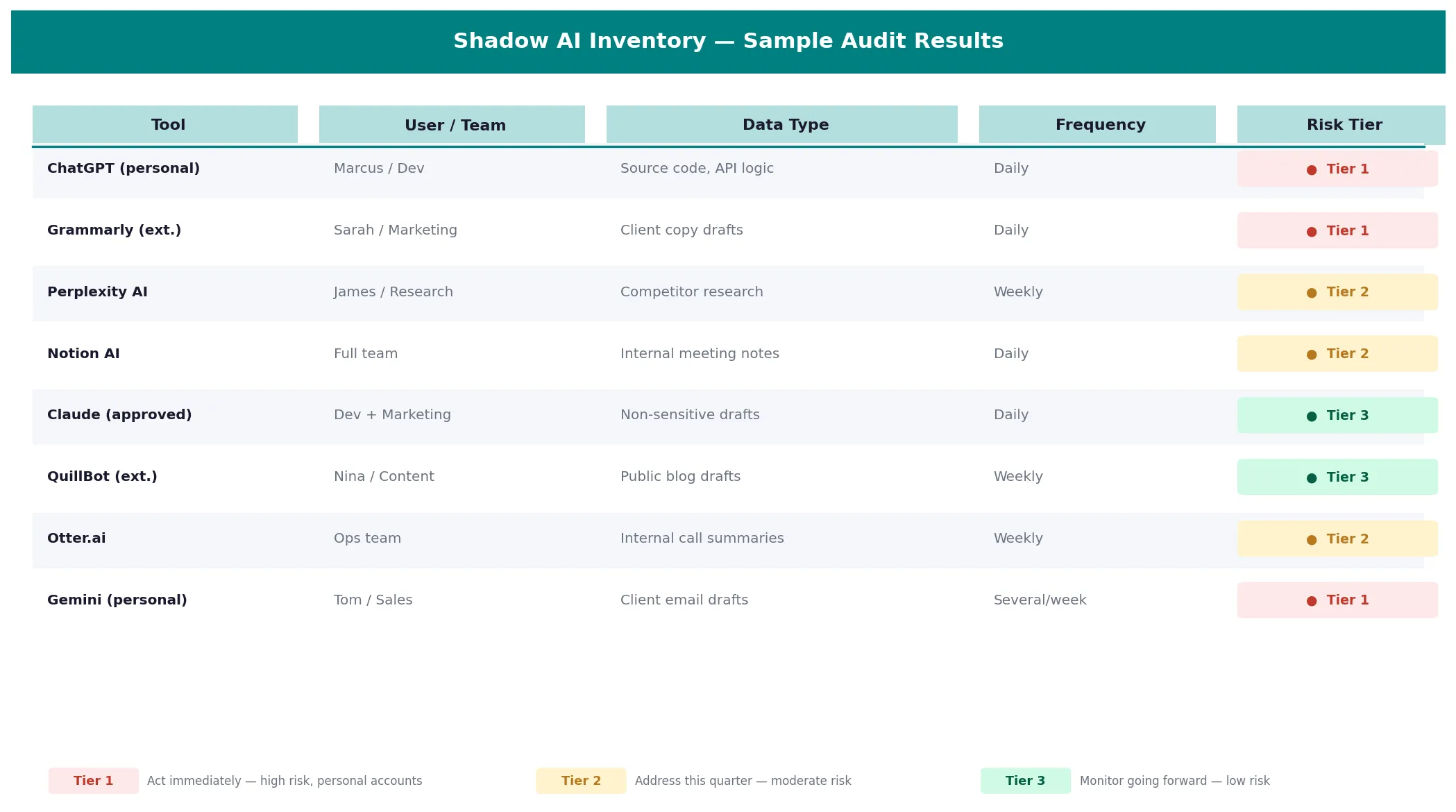
By the end of Phase 1, you should have a tool inventory: a spreadsheet listing every AI tool in use, who is using it, what they use it for, and whether it's currently approved.
Phase 2: Risk Assessment
Not everything in your tool inventory deserves equal attention. Phase 2 is about separating the things that matter from the things that don't.
Score Each Tool Against Four Factors
For each tool in your inventory, assess:
Data sensitivity.
What type of data is going into this tool? A tool used only for rewriting internal meeting notes is different from one being used to summarize client deliverables or analyze financial models.
Rate: Low / Medium / High.
Data retention.
Does the tool store conversations? Does it use them for model training? Free-tier tools typically retain and train. Paid enterprise tiers typically don't. Check the terms of service.
Rate: Low / Medium / High.
Account type.
Is this a personal account linked to a personal email, or a team account? Personal accounts have no organizational control, no ability to revoke access centrally, no audit trail, and no data processing agreement with your organization.
Rate: Personal (High risk) / Team (Medium) / Enterprise (Low).
Visibility.
Do you have any insight into what's being submitted? Or is this tool completely opaque to your organization?
Rate: None / Partial / Full.
Build a Risk Tier
After scoring, group tools into three tiers:
Tier 1 (Act immediately): High data sensitivity, personal accounts, no organizational visibility.
These are the tools where a real incident is plausible right now. If a team member is uploading client data to an unapproved personal account on a free-tier tool that trains on conversations, that's Tier 1.
Tier 2 (Address this quarter): Moderate risk, team accounts with weak settings, or approved tools being used for tasks outside their approved scope.
These aren't emergencies, but they need attention before they become one.
Tier 3 (Monitor going forward): Low data sensitivity, appropriate account types, or tools used in ways that don't create meaningful risk.
Log them, revisit quarterly, and focus your energy elsewhere.

Prevent accidental data leaks to ChatGPT, Claude, and Gemini.
Sequirly scans your prompts and uploaded files before they're sent. If it finds credentials, client records, or API keys, it stops you before the request goes out.
Phase 3: Remediation
Remediation looks different for each tier. Here's how to approach each one without creating a policy that gets ignored.
Tier 1: Act Immediately
For tools where real data is moving through unapproved, unmonitored channels right now:
Talk to the person first.
- Don't start with a policy email.
- Have a direct conversation about what they're trying to accomplish and why they reached for that tool.
- You'll almost always find a legitimate work need that your approved tools aren't meeting. Understand the gap before you close it.
Provide an approved alternative.
- The fastest way to eliminate a shadow tool is to replace the need it was meeting.
- If someone is using a personal ChatGPT account because the company's approved tool doesn't handle their specific task, add a tool that does.
Revoke access where you can.
- For tools with OAuth connections, revoke the connection from your admin console.
- For browser extensions, push an MDM policy to block or remove them from company devices.
Document the incident.
- Not for punishment.
- For your compliance record and so you understand your exposure if the issue comes up during an audit.
Tier 2: Address This Quarter
For moderate-risk tools, the work is usually policy and settings, not removal:
Lock down privacy settings.
For approved tools your team is using on wrong settings, go through the privacy configuration and toggle off training, conversation retention, and broad data sharing.
Our guide to preventing AI data leaks has a step-by-step settings checklist for ChatGPT, Claude, and Gemini.
Upgrade account types where needed.
If the team is using free personal accounts for work tasks, evaluate whether a team or enterprise plan is justified. The cost of an enterprise plan is often less than the liability of a data incident.
Update your approved tool list.
If some Tier 2 tools are legitimate work tools that just weren't formally approved, approve them with conditions.
Define which data can and can't go into them. Documented approval is better than invisible usage.
Tier 3: Systematize Going Forward
For lower-risk tools, the priority is building a process that keeps them low-risk over time:
Quarterly reviews.
Shadow AI isn't a one-time problem. New tools appear constantly.
Set a calendar reminder to repeat the domain check and survey every quarter. A 30-minute check-in is enough for teams under 50 people.
A lightweight approval path.
When someone finds a new AI tool they want to use, there should be a clear, fast way to get it reviewed.
A Slack message to a designated person, a shared form. If the approval path is unclear or slow, people default to just using the tool. That's how Tier 3 tools become Tier 1 ones.
A clear "never" list.
Some data categories should never go into any AI tool, approved or otherwise. Client data under NDA, credentials, financial records, PII.
Document this explicitly and put it somewhere visible. See our full category breakdown in the shadow AI overview.
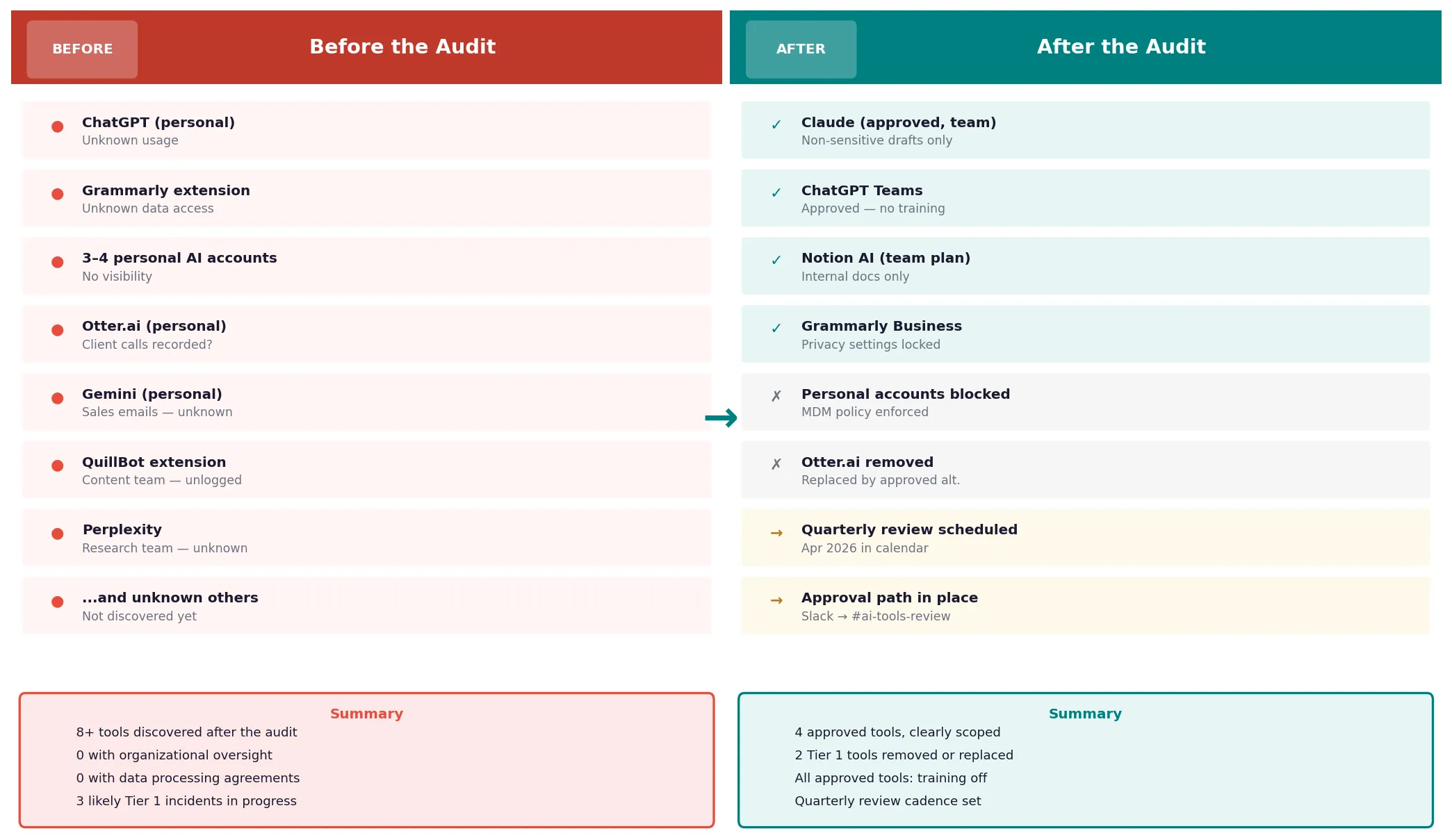
What to Do With the Audit Results
When you complete the audit, you'll have something most teams don't: actual visibility into their AI exposure.
A few things to do with that visibility:
Share a summary with your team. Not the full risk assessment, but the headline findings.
"Here's what we found, here's what we're changing, here's the new approved list."
Teams respond better to transparency than to policy emails that appear without context.
Use it as a compliance artifact. If you're pursuing SOC 2, preparing for a client security review, or managing GDPR obligations, a documented AI audit is evidence of a functioning data governance process. Keep a copy.
Revisit it quarterly. The audit results go stale fast.
An AI tool that was Tier 3 in January can become Tier 1 by April if the vendor changes its terms of service or if a team member starts using it for a new use case. The cadence matters as much as the initial audit.
Where to Start
You don't need to complete all three phases before making any changes. Here's a practical order:
- This week: Send the survey. Pull the browser extension list. Start building your tool inventory.
- Next week: Score everything you've found against the four risk factors. Identify your Tier 1 items.
- This month: Address Tier 1 directly. Lock down Tier 2 settings. Build the quarterly review into your calendar.
The audit itself doesn't require any tools. A spreadsheet and a few hours of honest conversation with your team is enough to start.
If you want browser-level protection while you're working through the fix, Sequirly can run alongside the audit process.
It catches sensitive data before it's submitted to any AI tool, giving you a safety net while the policy and process side catches up. It won't surface the shadow tools you haven't found yet, but once you have the inventory, it protects against the ones that remain.
The audit gives you the map. The rest is following it.