
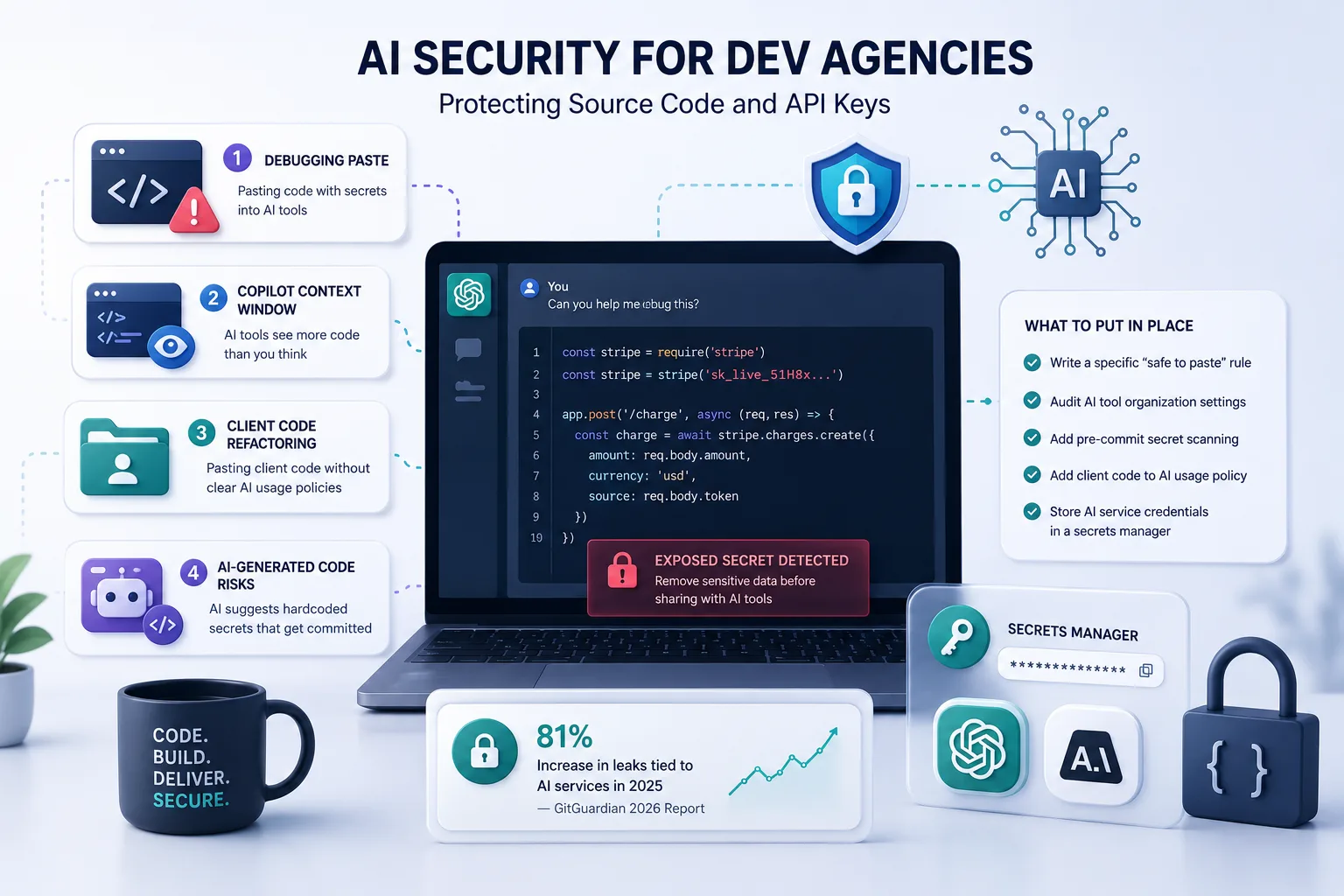
The last time a developer on your team pasted code into ChatGPT to debug it, they probably didn't check what else was in that snippet.
A debugging session typically pulls in 20 to 100 lines of surrounding context. Config values, connection strings, environment variables, client logic: any of it can travel to an external AI model in the same paste.
This post covers the actual exposure vectors in a normal developer workflow and what to do about them.
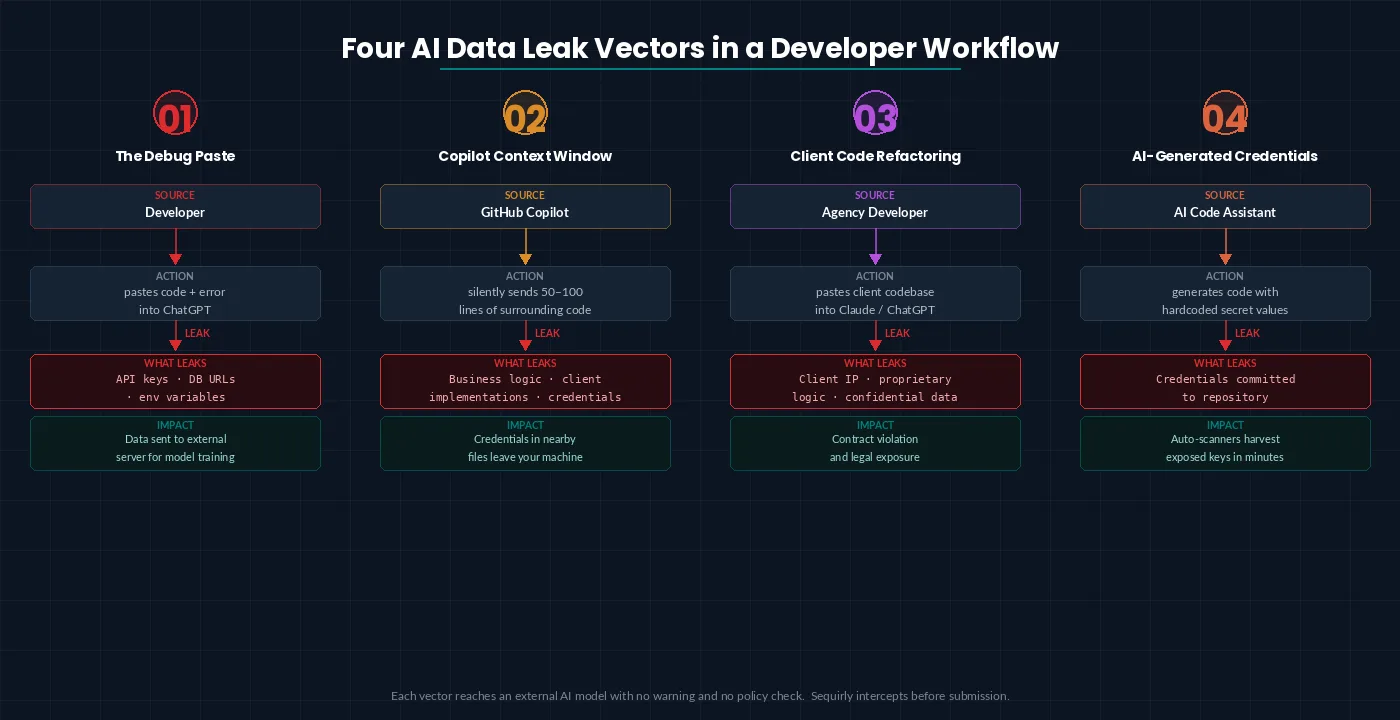
Four AI security risks for developers
1. The debugging paste
A developer on your team hits an error, grabs the error message along with a block of code to ask ChatGPT about it, and that block contains an API key, a database URL, or a token.
- On free and Plus plans, that data can be used for model training by default.
- On Team and Enterprise plans, training is off, but the data still traversed an external server outside your control.
Here, your developers are not thinking about security. They are just fixing the bugs.
2. GitHub Copilot's context window
Copilot doesn't just see what you type. It sends 50 to 100 lines of surrounding code to GitHub's servers to generate each suggestion.
That context can include proprietary business logic, client-specific implementations, and credentials stored in nearby files.
In October 2025, a high-severity vulnerability in GitHub Copilot Chat (CVE-2025-59145, CVSS 9.6) allowed attackers to extract source code, API keys, and cloud secrets from private repositories. It was patched before public disclosure, but it shows what's possible when an AI tool has persistent access to your codebase.
3. Pasting client code for refactoring
Dev agencies work on client codebases. Developers paste client code into ChatGPT or Claude to understand it, refactor it, or extend it faster.
The client likely didn't agree to that.
Most agency contracts were written before AI code assistants existed. You're now handling multiple client codebases. Each with different confidentiality expectations and sending pieces of them to external models under agreements that don't mention AI at all.
That's a contract violation waiting to happen.
For agencies, a single incident is a client conversation, a legal review, and potentially a lost account.
4. AI-generated code that introduces credentials
When AI tools generate code, they sometimes hardcode values that should be environment variables. Developers accept the suggestion, test it locally, and commit.
The credential travels with the code into the repository.
Here's what this typically looks like:
_An engineer debugging a payment integration pastes 60 lines into Claude. The snippet includes a Stripe secret key. An automated scanner flags the key within minutes of the next commit. By the time it's rotated, unauthorized charges have already run. No malicious intent—just a debugging session._
For documented cases of how this plays out in practice, 5 Real ChatGPT Data Leaks That Cost Companies Millions walks through specific incidents including Samsung's 2023 source code exposure.
What to put in place
1. Write a specific "safe to paste" rule
Not "be careful with sensitive data."
The exact rule: no database connection strings, no API keys, no tokens, no anything with a value that isn't in your public documentation.
Add it to onboarding and your code review checklist. It takes 30 seconds to apply and prevents the most common leak type.
2. Audit your GitHub Copilot organization settings
In your GitHub organization settings, check whether training data collection is enabled, whether chat data is used for model improvement, and whether suggestions are filtered for public code matching.
The defaults changed in 2026. Verify the current state rather than assuming it matches your original setup.
3. Add pre-commit secret scanning
Tools like Gitleaks and TruffleHog scan commits for secrets before they leave your machine.
Set them up as pre-commit hooks. They catch AI-generated suggestions that hardcode credentials before those credentials reach the repository.
4. Add client code to your AI usage policy
If you handle client codebases, your AI policy needs to explicitly state what can and cannot be pasted into external tools.
This protects you legally as much as it protects the client. One paragraph in an existing policy is enough to establish the rule.
5. Treat AI service credentials as production secrets
Your OpenAI API key, your Anthropic key, your GitHub token: these belong in a secrets manager, not in a `.env` file checked into a shared repository.
For the broader policy and governance layer these controls fit into, AI Security for Teams: The Complete 2026 Protection Guide covers team-level security across tools, policy, and monitoring.

Prevent accidental data leaks to ChatGPT, Claude, and Gemini.
Sequirly scans your prompts and uploaded files before they're sent. If it finds credentials, client records, or API keys, it stops you before the request goes out.
Where to start
If you're setting this up from scratch, work in this order.
Week 1: Add pre-commit hooks. Gitleaks takes under 10 minutes to configure and starts catching credential commits immediately. Brief the team on the paste rule in writing.
Week 2: Audit your Copilot organization settings. Check every field in the data policy section.
Week 3: Update your AI usage policy to cover client code handling. Review any active client contracts for confidentiality or AI-related clauses.
Ongoing: Rotate AI service credentials quarterly. Confirm secrets manager coverage extends to every team member who has access to production keys.
The AI Security Checklist for Teams Under 50 covers additional controls beyond the developer-specific items above.
And, you don't need a dedicated security role or a platform rollout.
One more layer
Those steps cover what your team does intentionally.
They don't cover the moment someone grabs a file to ask Claude something quickly and doesn't notice the credentials three functions down. Policies don't stop behavior under pressure.
Sequirly is built for that exact moment. It detects sensitive data (API keys, credentials, and patterns you define) before the prompt is submitted.
It works across ChatGPT, Claude, Gemini, and every other AI tool your team uses in the browser. No IT configuration required.
Most teams don't realize how often this is happening until they actually see it.
Try Sequirly free and see what your team's AI usage actually looks like.