
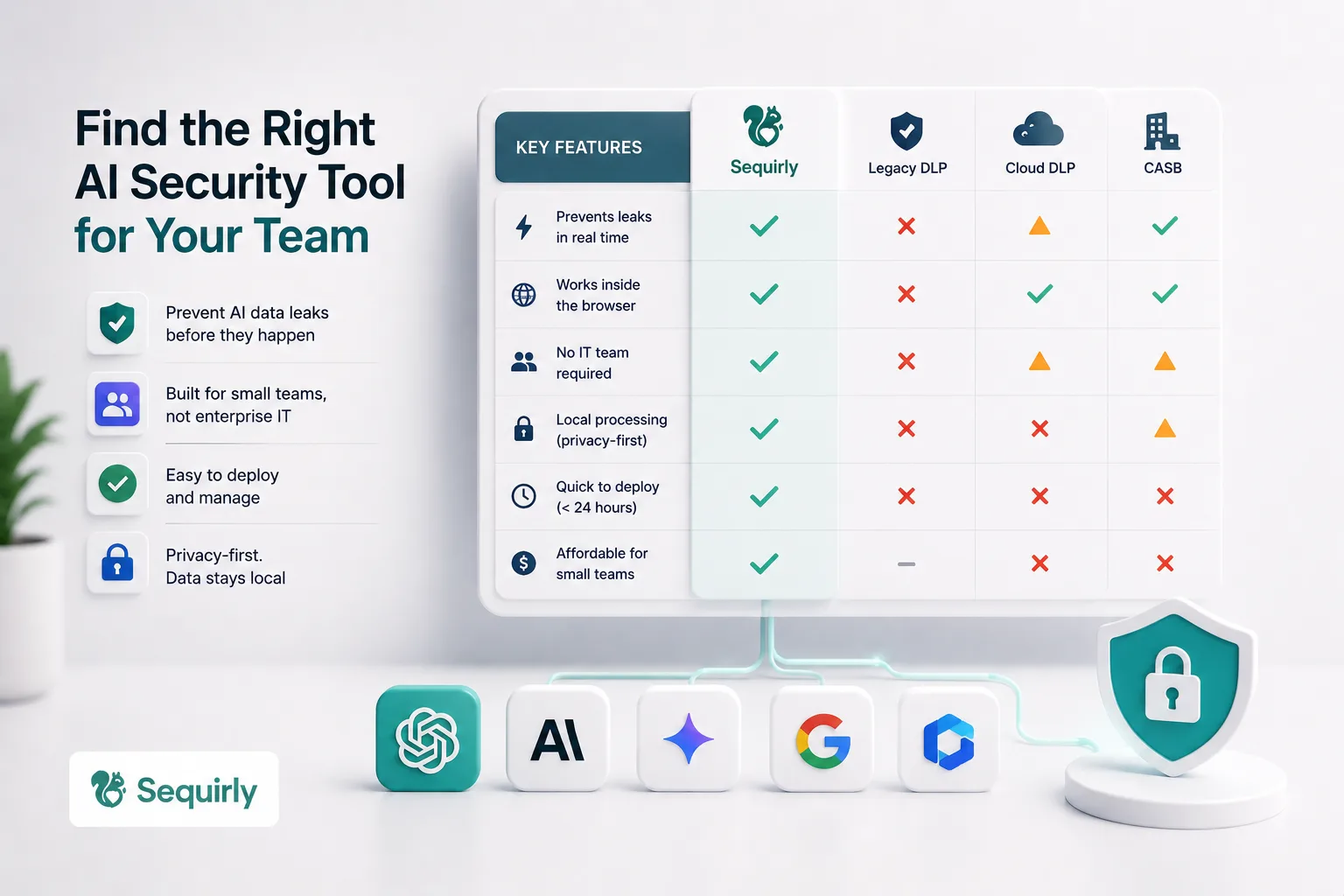
Most AI security tools are built for enterprise IT teams with six-figure budgets, dedicated compliance staff, and months to spend on implementation.
If you're running a team of 10, 20, or 50 people, those tools are not built for you. And using the wrong one is worse than using none at all, because it gives you a false sense of coverage.
This guide breaks down the actual options available for small teams:
- what each one does well,
- where each one falls short, and
- how to figure out which category fits where you are right now.
Why Most AI Security Tools Miss Small Teams
68% of organizations have experienced data leakage from employee AI usage.
The vendors who saw that statistic built platforms to sell to Fortune 500 CISOs.
Which means the tools most often recommended (Symantec, Microsoft Purview, Forcepoint, Netskope) require dedicated IT staff to deploy, months of configuration, and licensing costs that start at hundreds of dollars per user per year.
For a 20-person agency or a 40-person SaaS team, that math doesn't work.
The second problem is coverage.
Traditional DLP tools are not designed for the pace at which new AI tools are released and operate. When your developer pastes a database connection string into ChatGPT, a legacy DLP tool running at the network layer often cannot see that. It happens inside an encrypted HTTPS session, inside the browser, in real time.
So you're left with a gap: enterprise tools you can't afford or deploy, and nothing lightweight that actually catches AI-specific data leaks.
That gap is starting to close. But you need to understand the categories before you pick a tool.
What to Look For: Six Criteria That Matter
Before comparing any tool, you need a framework. Otherwise you end up choosing based on marketing copy rather than fit.
Here is what actually matters for small teams.
1. Does it work before the leak happens?
The only leak that matters is the one that's about to happen. A tool that tells you what leaked last Tuesday does not prevent the leak. It writes a report.
Prevention means catching the data before it leaves the browser, at the moment someone is about to paste a client spreadsheet into ChatGPT, not after.
2. Does it require an IT team to run?
If setup takes longer than 24 hours, or if ongoing management requires a dedicated person, small teams will let it drift. You need something that works in the background with minimal upkeep.
3. Does it process data locally?
Think about what AI security tools are protecting: sensitive data.
If a tool sends that data to yet another cloud server to be "analyzed," you've added another party with access to your most sensitive information.
Local processing means your data never leaves the device.
4. Is it a guardrail or a cage?
AI tools changed how people work. People now type their raw thinking into these tools, half-formed ideas, sensitive context, client details, because that's what gets good results. That prompting behavior is the whole point.
A tool that logs every word your team types into ChatGPT doesn't protect them. It surveils them. And once people know they're being watched, they either stop using AI tools (which you don't want) or they start being careful about what they type (which defeats the purpose of using AI at all).
The right tool catches the specific risk signals, credentials, PII, client data, and logs only that. Not the conversation. The signal.
5. Does it create friction or reduce it?
Your team will route around tools that slow them down.
A tool that blocks everything, flags false positives constantly, or requires manual approval for every AI interaction will get disabled. The best ones are invisible until something actually risky happens.
6. Is it priced for your reality?
Per-user costs add up fast. A tool at $100/user/month is $60,000 per year for a 50-person team. Make sure the math makes sense before you fall in love with a feature list.
Browser-Level AI Protection Tools
This is the newest category, and the most relevant one for teams where AI usage happens primarily through browsers.
When your team uses ChatGPT, Claude, Gemini, Copilot, or any other web-based AI tool, they're doing it through Chrome, Edge, or another browser.
Browser-level tools sit inside the browser and see what's happening before it gets sent.
Sequirly
Sequirly is built around a single idea: security should live inside the AI workflow, not outside it.
Most tools in this space are designed to monitor what's already happened. Sequirly intervenes at the moment a prompt is about to be sent, before it leaves the browser.
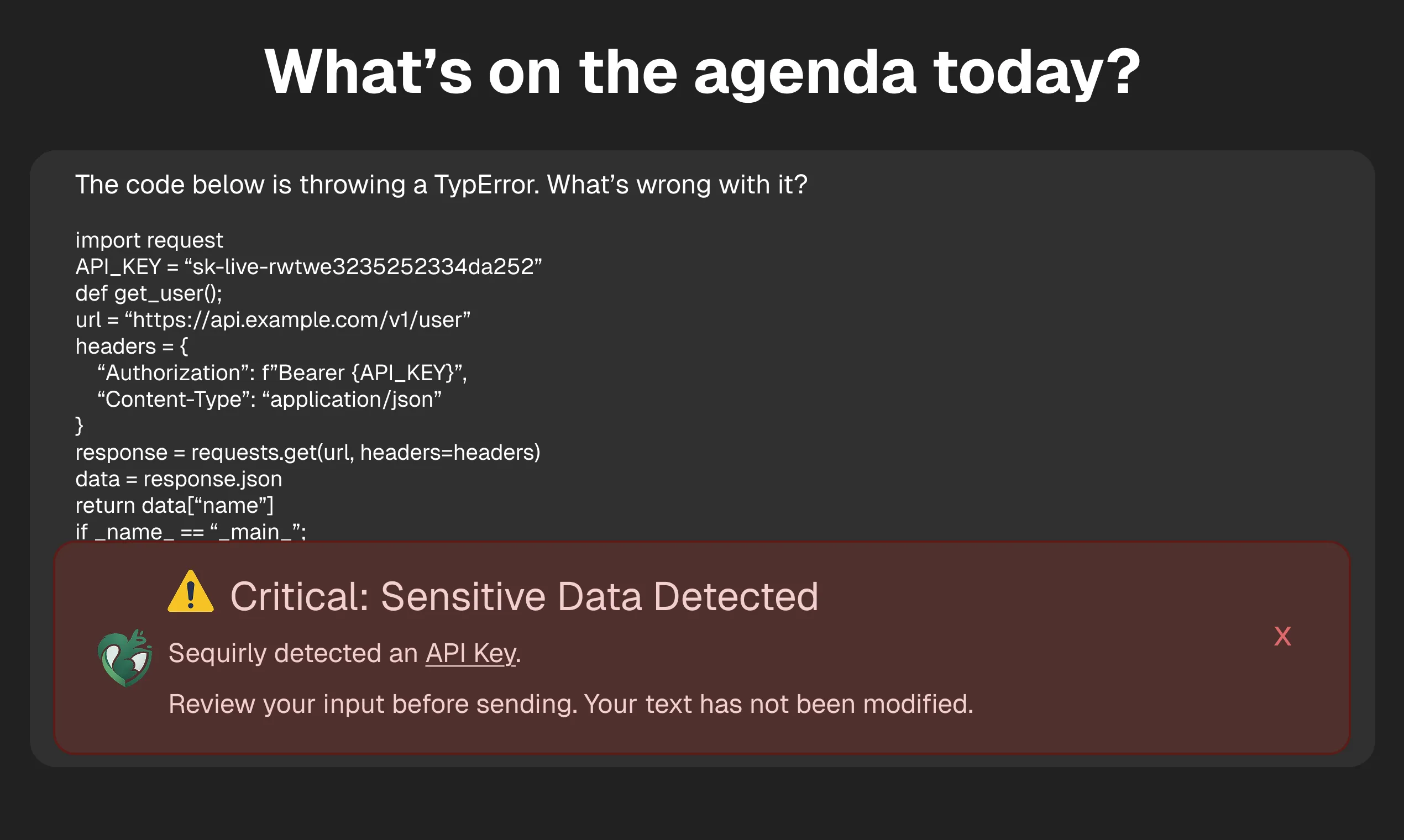
When sensitive data is detected (credentials, PII, client data, API keys), the team member gets a non-intrusive alert. They can now review and edit the prompt before it goes.
They can still choose to send the data, but this time it's intentional, not accidental.
What separates Sequirly from everything else in this category is how it handles context.
The platform lets admins upload their own policy documents and define custom rules, so what gets flagged is specific to your team's actual risk profile, not a generic list of data types.
A legal firm, a marketing agency, and a healthcare team all have different definitions of "sensitive." Sequirly reflects that.
All scanning runs locally inside the browser. Nothing Sequirly detects ever reaches its servers.
The admin panel shows metadata: which AI tool, which data category, what action was taken. It doesn't log the content of what your team typed.
That distinction matters: this is a guardrail, not a surveillance system.
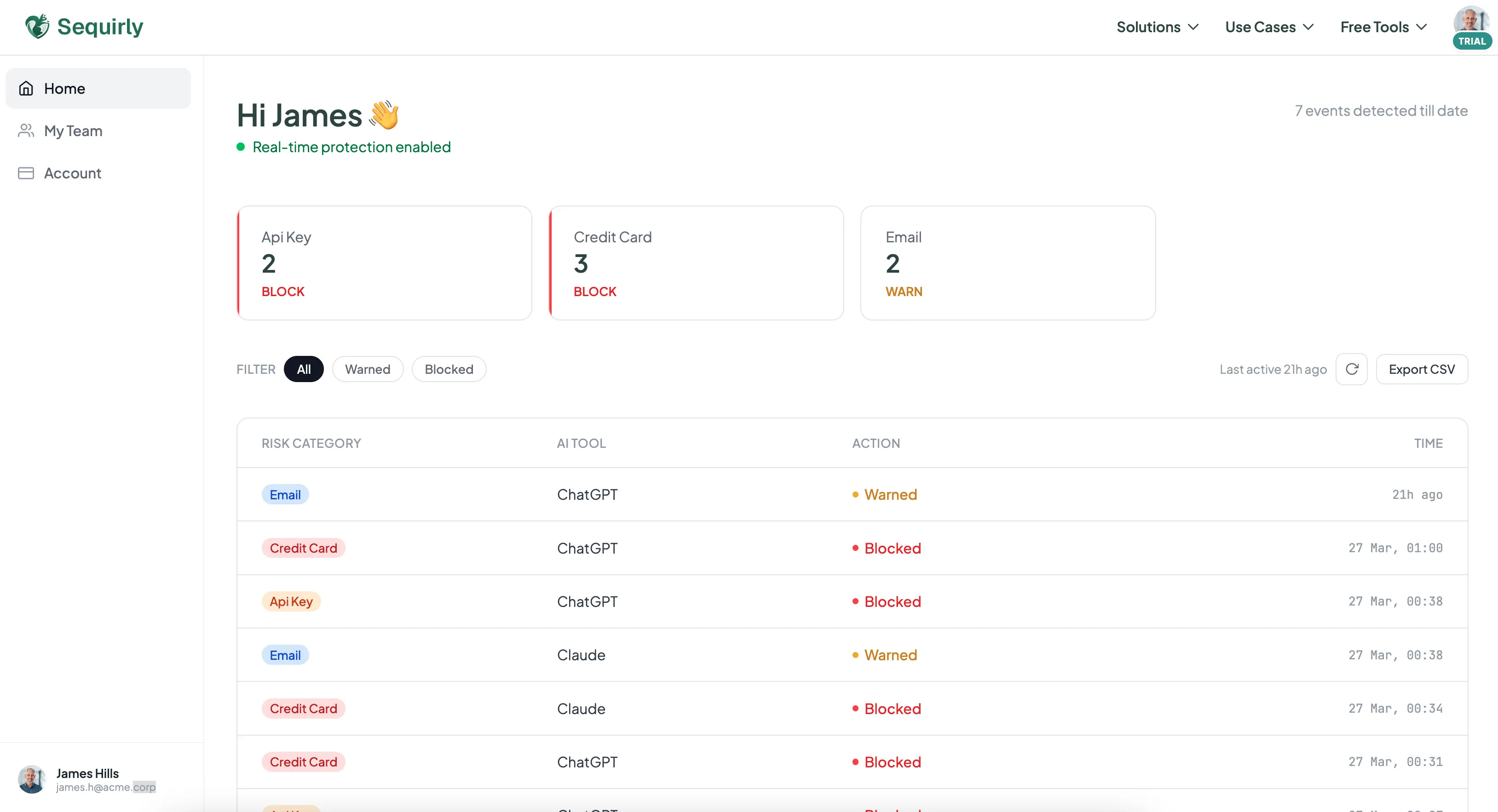
For compliance documentation, the admin panel gives operations leads exactly what they need, a record of flagged events, actions taken, and data categories involved. A focused log of the risk signals, not a transcript of your team's work.
What it does well:
- Catches sensitive data before it leaves the browser, not after
- Custom policies: upload your own documents and rules, not just default data types
- Admin panel with metadata for compliance documentation and oversight
- Fully local processing: nothing passes through Sequirly's servers
- 2-minute setup, no IT team required
What it doesn't do:
- Doesn't cover desktop AI apps (only browser-based tools)
- Doesn't replace an AI usage policy; it enforces one
- Isn't an enterprise DLP platform; it's a guardrail for teams that move fast
Pricing: Free trial available. Paid plans are priced for small teams, contact sequirly.com for current pricing.
Best for: Teams under 100 who want browser-level prevention with policy customization and compliance visibility, without the overhead of enterprise DLP.
Nightfall AI
Nightfall started as a cloud DLP platform covering Slack, Google Drive, and GitHub. In early 2026, they launched a browser extension for real-time AI protection.
Nightfall is a broader platform. If you need coverage across cloud storage, SaaS apps, and browser-based AI tools under one roof, that's where it adds value, particularly for larger teams with existing compliance workflows.
What it does well:
- Strong detection accuracy for structured data (PII, card numbers, SSNs)
- Covers cloud apps and SaaS in addition to the browser
- Compliance reporting and audit logs built in
What it doesn't do:
- Processes data through Nightfall's cloud servers, not locally
- No support for custom policy documents or team-specific rules, detection is based on Nightfall's predefined data types
- Pricing and deployment are heavier than tools designed for small teams
- If you only need browser-level AI protection, the broader platform is more than you need
Pricing: Not publicly listed. Nightfall uses custom enterprise pricing, expect to go through a sales process. Not structured for small teams doing self-serve sign-ups.
Best for: Teams that already use cloud DLP for Slack/Google Drive and want to extend that coverage to AI tools without switching platforms.
LayerX
LayerX is a browser security platform that covers AI governance as one part of a broader browser security offering. It turns any commercial browser into a managed workspace, monitoring AI usage, managing extensions, and applying DLP policies.
Where LayerX goes further than AI-specific tools is in extension risk management. After the Urban VPN incident (where a Chrome extension started harvesting AI conversations from 6 million users through a routine update), extension auditing is a real concern. LayerX gives you visibility into what browser extensions your team has installed and what permissions they've granted.
What it does well:
- Full browser security beyond just AI (extension management, SaaS DLP, AI governance in one)
- Works across Chrome, Edge, and other browsers
- Strong for teams already thinking about browser security holistically
What it doesn't do:
- Priced for mid-market and enterprise, not small teams
- More complex to deploy and manage than lightweight options
- Broader scope means more configuration time
- Does not offer custom policy documents or team-specific rule definitions
Pricing: Not publicly listed. Subscription-based, priced per user/browser per year, available on request. Enterprise-tier pricing structure.
Best for: Teams that want a full browser security platform, not just AI DLP. Works well for companies with a part-time IT manager who can handle the setup.

Prevent accidental data leaks to ChatGPT, Claude, and Gemini.
Sequirly scans your prompts and uploaded files before they're sent. If it finds credentials, client records, or API keys, it stops you before the request goes out.
Enterprise DLP Tools Extended to AI
These tools weren't built for AI. They were built for email, file storage, and network traffic. But vendors have been adding AI coverage, and for teams already inside their ecosystems, it's worth knowing what's available.
Microsoft Purview
If your team is on Microsoft 365, Microsoft Purview is already in your stack. In 2025, Microsoft added AI-specific DLP policies through Endpoint DLP, you can configure rules that warn or block users from pasting sensitive data into ChatGPT or other web-based AI tools.
The coverage is Windows-only for endpoint DLP. Mac users and mobile devices are not covered. And configuring Purview properly requires someone comfortable in the Microsoft admin console, this is not a 15-minute setup.
What it does well:
- Already included in many M365 Business Premium and E3/E5 plans
- Deep integration with Microsoft Copilot if you're using it
- Full audit logs and compliance reporting built in
What it doesn't do:
- Windows-only for endpoint protection
- Requires IT expertise to configure properly
- Not designed for protecting data across non-Microsoft AI tools
Pricing: Included with M365 Business Premium (~$22/user/month), E3 (~$36/user/month), and E5 (~$57/user/month). If you're already paying for one of these plans, there's no additional cost, just the time to configure it.
Best for: Teams already on M365 with someone who can navigate the admin console. If you're paying for a plan that includes Purview, it's worth setting up the AI DLP policies.
The Free Layer: Built-In Privacy Settings
Before spending on any tool, there's a layer of protection that costs nothing and most teams skip.
Every major AI platform has privacy settings that control whether your conversations are used to train their models. Turning these off doesn't prevent leaks, but it limits what happens to your data after it's been shared.
- ChatGPT: Settings > Data Controls > toggle off "Improve the model for everyone." On ChatGPT Team and Enterprise, this is off by default, but verify. Also check that your team is using company workspaces, not personal accounts.
- Claude: Anthropic updated its data policy in September 2025. If you didn't actively opt out after that update, your settings may have defaulted to allowing data use. Go in and verify.
- Google Gemini: Check "Gemini Apps Activity" in Google account settings. Turn off conversation saving for any work involving client or sensitive data.
- Microsoft Copilot: Review the data handling settings in your admin panel. Pay attention to which data sources Copilot can access, by default, it may have broader access than you expect.
This takes 15 minutes across your team. It should be done regardless of what other tools you add.
For a step-by-step walkthrough of privacy settings across all major AI tools, see our guide on how to prevent AI data leaks.
Quick Comparison Table
| Tool | Best for | Intercepts before send? | Custom policies? | Admin reporting? | Local processing? | Pricing |
|---|---|---|---|---|---|---|
| Sequirly | AI Workflow Security for small teams | Yes | Yes | Yes (metadata) | Yes | Free trial; paid plans for small teams |
| Nightfall AI | Multi-surface DLP (Slack, Drive + AI) | Yes | No | Yes (compliance) | No (cloud) | Custom enterprise pricing |
| LayerX | Full browser security platform | Yes | No | Yes | No (cloud) | Custom enterprise pricing |
| Microsoft Purview | M365 shops with IT admin | Yes (Windows only) | Yes | Yes (full audit) | No | Included in M365 Business Premium / E3 / E5 |
| Privacy Settings | Everyone, as a first step | No | No | No | N/A | Free |
Which Is Right for Your Team
"We're 5-20 people and nobody owns security."
Start with AI tool privacy settings. It's free and only takes 15 minutes (see section above). Then add Sequirly. That combination closes the two biggest gaps, data training exposure and accidental prompt leaks, without requiring anyone to manage it ongoing.
"We're 20-100 people with an ops lead or part-time IT."
Sequirly handles browser-level AI protection. If your team is on M365, have your ops lead enable the AI DLP policies inside Microsoft Purview on top of it. Two layers, neither requires a full IT team to run.
"We're already paying for Nightfall or LayerX."
Check whether your existing plan now covers AI tool protection. Both platforms have added browser extensions in 2026. If it's included, configure it. If you're still missing custom policy support or local processing, Sequirly runs alongside either tool without conflict.
"We're in healthcare, legal, or finance and need documented compliance."
Check Sequirly's admin reporting first. For many regulated small teams, the metadata log (AI tool, data category, action taken) is exactly what auditors want to see. If you need a deeper audit trail or are already inside M365, layer in Microsoft Purview for the full event log.
The most common mistake small teams make is buying an enterprise tool because it sounds the most serious, then never deploying it because it's too complex.
A lighter tool that's actually running is worth more than a heavy tool sitting unconfigured.
For a deeper look at how data leaks through AI tools and how to build a full protection framework, the AI Security for Teams guide covers the full picture. If you're not sure whether shadow AI is already happening on your team, this audit framework is the place to start.
Where to Start
You've read the comparison. You know your team's situation. The only thing left is the first action.
If you're not sure which tool fits, don't start there. Start with the free layer. Open ChatGPT, Claude, and Gemini right now and toggle off model training. It takes ten minutes and has zero risk. That one step means your team's data stops being used to train external models, regardless of what else you add later.
Then ask your team a single question this week: "Which AI tools are you actually using for work?" Not which tools you approved. Which ones they're using. 78% of workers use AI tools their company didn't approve. The answer to that question tells you exactly what you're protecting against.
After that, the choice of tool gets simple. Only 36% of organizations have any AI security policies in place which means most of your competitors are still flying blind. Getting something running this week puts you ahead of the majority, not just compliant.
Give Sequirly a try. It installs in two minutes and starts showing you what's moving through your team's AI tools immediately.