
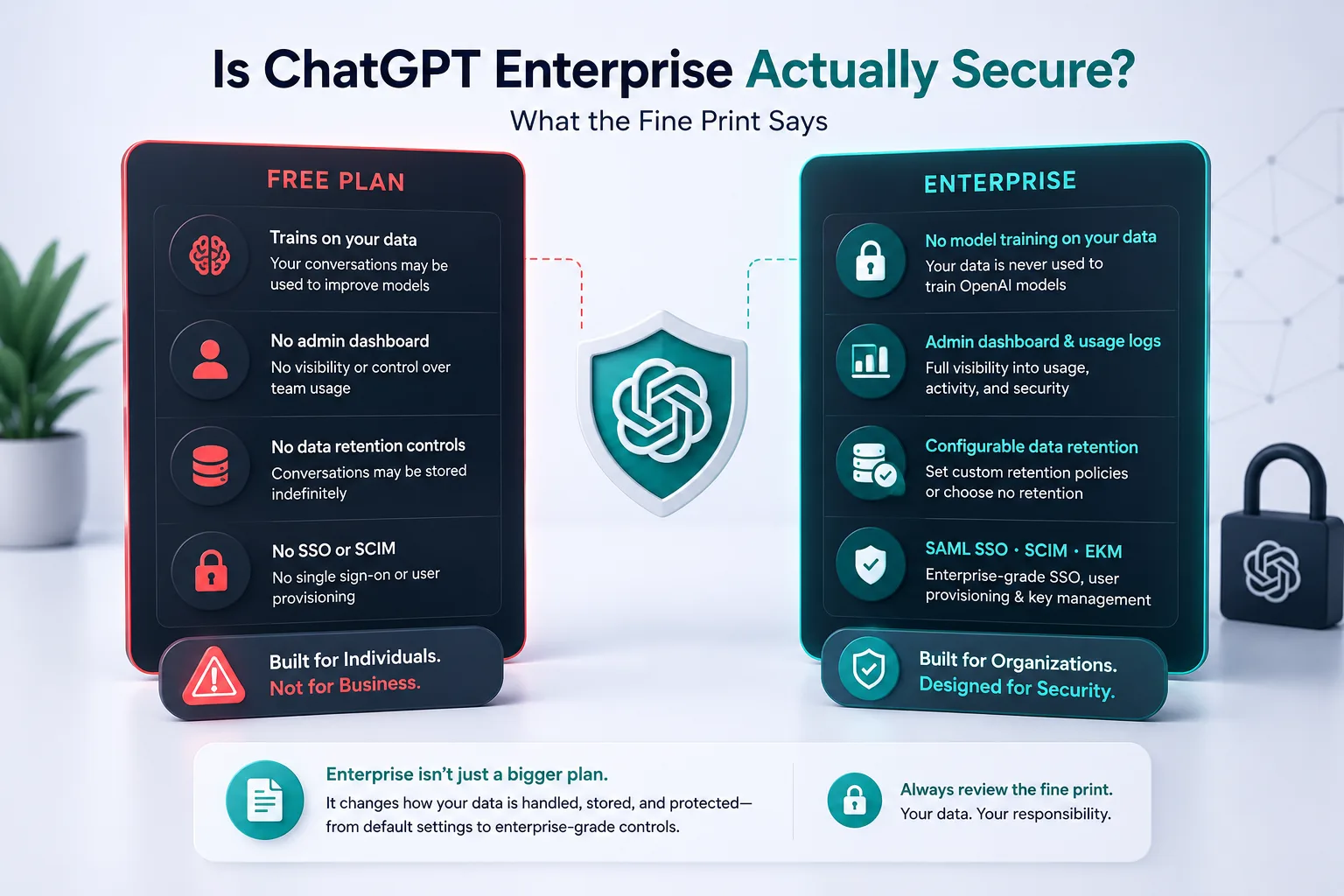
ChatGPT Enterprise's "no training on your data" promise is real.
It's also not the same as your data being safe.
OpenAI won't use your conversations to train the model — that's a genuine protection. But your conversations still pass through OpenAI's infrastructure. Your team can still bypass your workspace entirely by signing into a personal account in the next browser tab. And third-party integrations extend your data surface in ways the base plan doesn't address.
Here's what ChatGPT Enterprise actually gives you, what the fine print says, and where the gaps are.
What ChatGPT Enterprise Actually Gives You
The plan covers the infrastructure basics properly. AES-256 encryption at rest, TLS 1.2+ in transit, SOC 2 Type 2 compliance, SAML SSO with role-based access controls — and an admin dashboard where you can manage users, review usage, and set data retention rules.
OpenAI doesn't use your conversations to train the model by default on Enterprise. That's a real protection, not a marketing claim.
You also get domain verification, user lifecycle management via SCIM, and Enterprise Key Management (EKM) if you want to hold your own encryption keys. Data at rest can be stored in specific regions (US, EU, UK, Japan, etc.) if your compliance requirements call for it.
If you're comparing this to letting your team run on personal free accounts with no controls, Enterprise is meaningfully better. The question is what it doesn't cover.
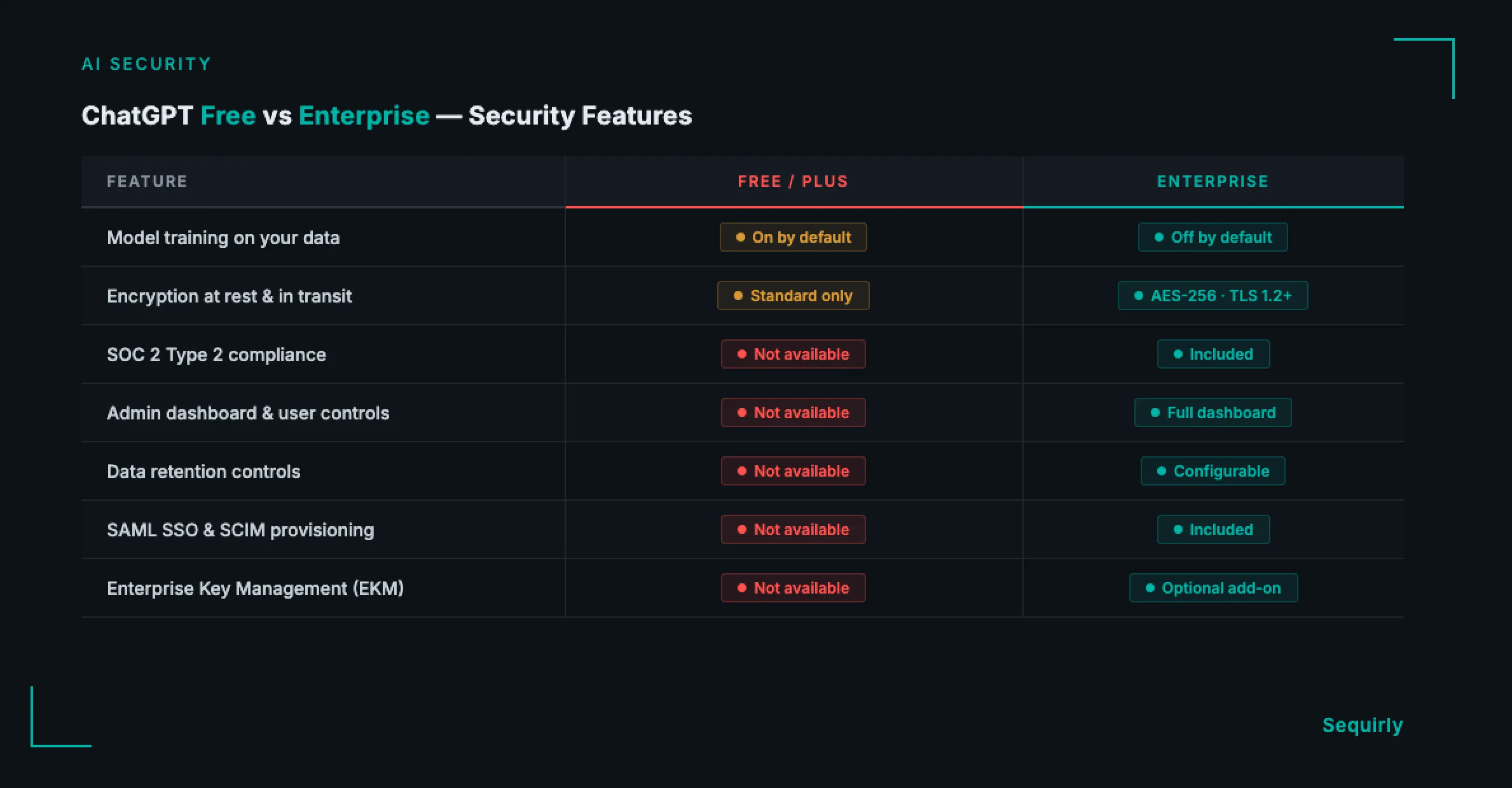
What the ChatGPT Enterprise Fine Print Actually Says
This is where the contract language starts to matter.
OpenAI doesn't train on your data, but it still processes it.
Your conversations pass through OpenAI's infrastructure. "No training" means OpenAI won't use your prompts to improve the model.
It doesn't mean the data never touches their servers. It goes there, gets processed, and comes back.
The distinction matters when you're deciding what data should leave your systems at all.
Data retention isn't zero by default.
You can configure retention settings, and deleted conversations are supposed to be gone within 30 days. "Within 30 days" isn't immediate, though — and if a legal hold applies, OpenAI can retain data beyond that window regardless. The policy says so explicitly. That 30-day expectation has exceptions you don't control.
Employees can bypass every Enterprise control.
This is the largest gap in practice, and it's rarely covered in vendor documentation.
If a team member opens ChatGPT in their personal browser and signs into their personal account, they're outside your Enterprise workspace entirely. Your admin dashboard doesn't see it, your retention settings don't apply to it, and OpenAI's no-training promise only covers your workspace — not what happens in the tab next to it.
ChatGPT Enterprise secures the workspace you configured. It has no visibility into what happens in the browser next to it.
The same gap applies with Claude Teams and Gemini Workspace. For a side-by-side look at how the major AI tools handle data by default, see ChatGPT vs Claude vs Gemini: Which AI Tool Is Safest?
Third-party integrations expand your exposure.
ChatGPT Enterprise supports GPT Actions: custom integrations that connect ChatGPT to internal tools, databases, and APIs. Each integration you add is another path where data travels.
Enterprise doesn't audit those connections or extend the same protections to third-party endpoints. Managing that surface is your responsibility.

Prevent accidental data leaks to ChatGPT, Claude, and Gemini.
Sequirly scans your prompts and uploaded files before they're sent. If it finds credentials, client records, or API keys, it stops you before the request goes out.
The Gap Enterprise Can't Cover
ChatGPT Enterprise secures OpenAI's infrastructure.
It doesn't secure what your team has been sharing with AI tools.
A client contract, a prospect's email address, an internal API key pasted into a prompt for a quick debug: none of that is visible to your Enterprise admin controls.
The platform processes it, but the decision to include it happened in your team member's browser, before the submission.
Enterprise-level agreements with OpenAI govern what happens to your data once it arrives. They say nothing about whether it should have arrived in the first place.
That's a question only answered at the browser level, before someone hits send. That's the problem AI data loss prevention is built to address.
For a broader view of where AI security risks sit for small and mid-size teams, AI Security for Teams: The Complete 2026 Guide covers where the actual exposures are.
Where to Start
If you're on ChatGPT Enterprise and want to reduce your actual exposure, work through these in order.
Audit your actual usage first.
Before any policy decision, find out how many of your team members are using personal ChatGPT accounts alongside the Enterprise workspace. Most teams find this number is higher than expected, and it's the number that determines your real exposure.
Configure data retention settings now.
The defaults are not the most restrictive option available. Your admin dashboard lets you shorten retention windows and set deletion rules.
Do this now, before your team is deep into active usage.
Write a specific data rule, not a lengthy policy.
A single, concrete instruction does more than a long document. "Client names and contact details don't go into any AI tool without anonymizing first" is enforceable.
A 20-page policy document is not.
Add a control at the browser layer.
Enterprise controls work at the account and API level. They don't intercept what an employee types before hitting send.
If your team works with regulated data, client confidential information, or credentials, you need something that works before the data leaves the browser, regardless of which AI tool is open or which account a team member is signed into.
Sequirly works at that layer — sitting between your team and whatever AI tool they have open, catching sensitive data before the prompt gets sent. API keys, PII, client data, credentials: it blocks the submission before anything reaches an external model. Works across ChatGPT, Claude, Gemini, and any other browser-based tool. Everything runs locally, so Sequirly itself never sees what your team typed.
ChatGPT Enterprise is worth having. It covers the OpenAI side of the risk.
Run a free audit of your team's current AI exposure at sequirly.com/tool/audit to see where the gaps are before they become incidents.