
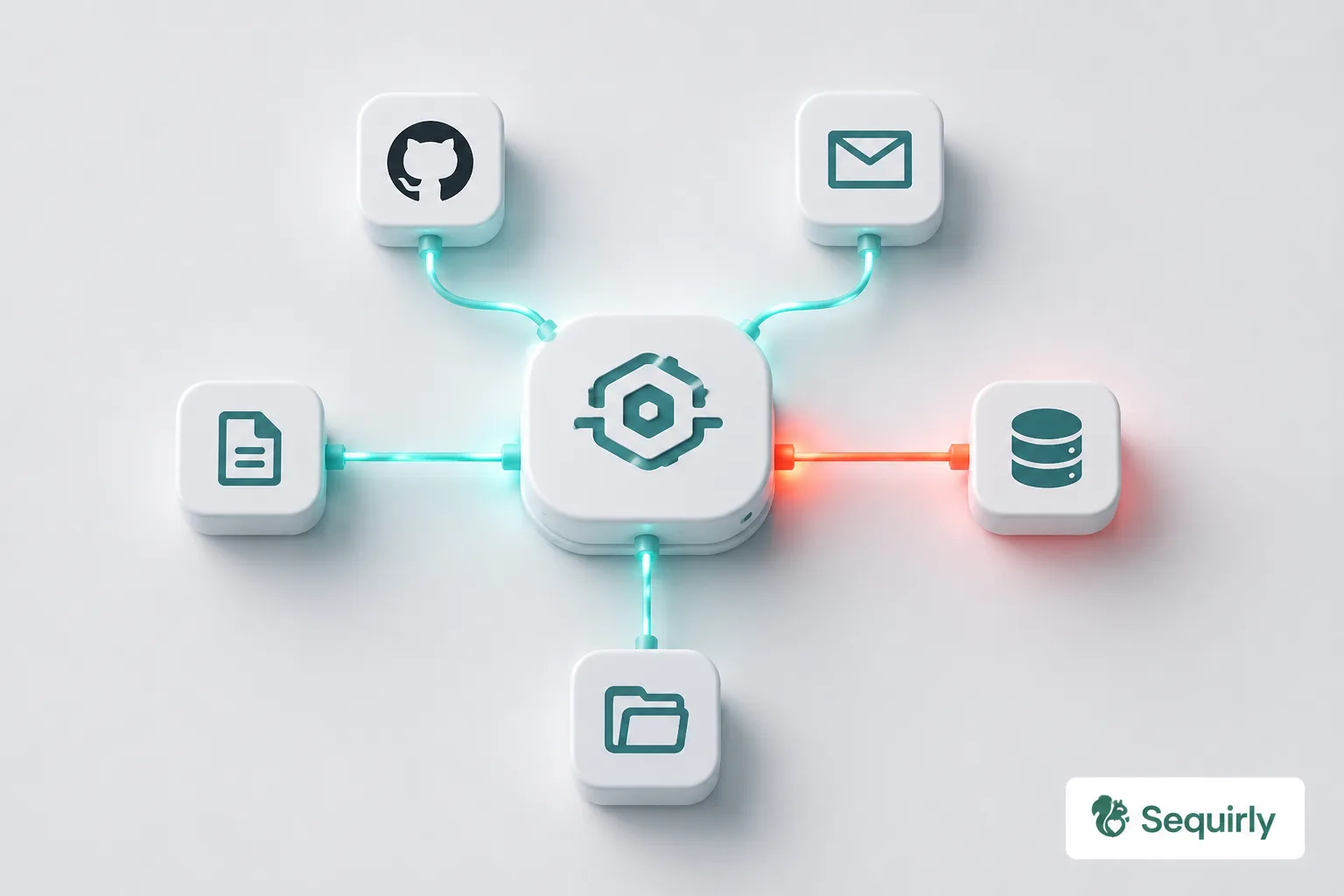
If anyone on your team uses Claude Desktop, Cursor, or Windsurf, they're already running MCP.
The Model Context Protocol ships inside these tools by default. Your team didn't configure it, didn't request it, and probably doesn't know what it connects to.
This guide covers MCP security: what the protocol actually is, what the risks look like in practice, and what you should check this week.
If your team uses AI tools and you've never checked what those tools can connect to, this is where to start.
What MCP is and why it's already on your team's machines
The Model Context Protocol (MCP) is an open standard that lets AI assistants connect to external tools, data sources, and systems.
Before MCP, an AI tool like Claude could only work with what you typed into the chat window. With MCP, it can read your files, query your database, pull from your calendar, create GitHub issues, and send emails.
The analogy that has stuck is "USB-C for AI agents." MCP is a universal connector. Plug in an MCP server and your AI assistant gains access to whatever that server exposes.
The problem: these servers often expose far more than you intended.
Anthropic introduced MCP in November 2024. By December 2025, Google, Microsoft, AWS, and Cloudflare had backed its move to the Linux Foundation as a shared industry standard.
It is now infrastructure, not a niche developer experiment.
The three ways MCP creates security risk
MCP introduces attack surfaces that don't exist with ordinary browser-based AI usage.
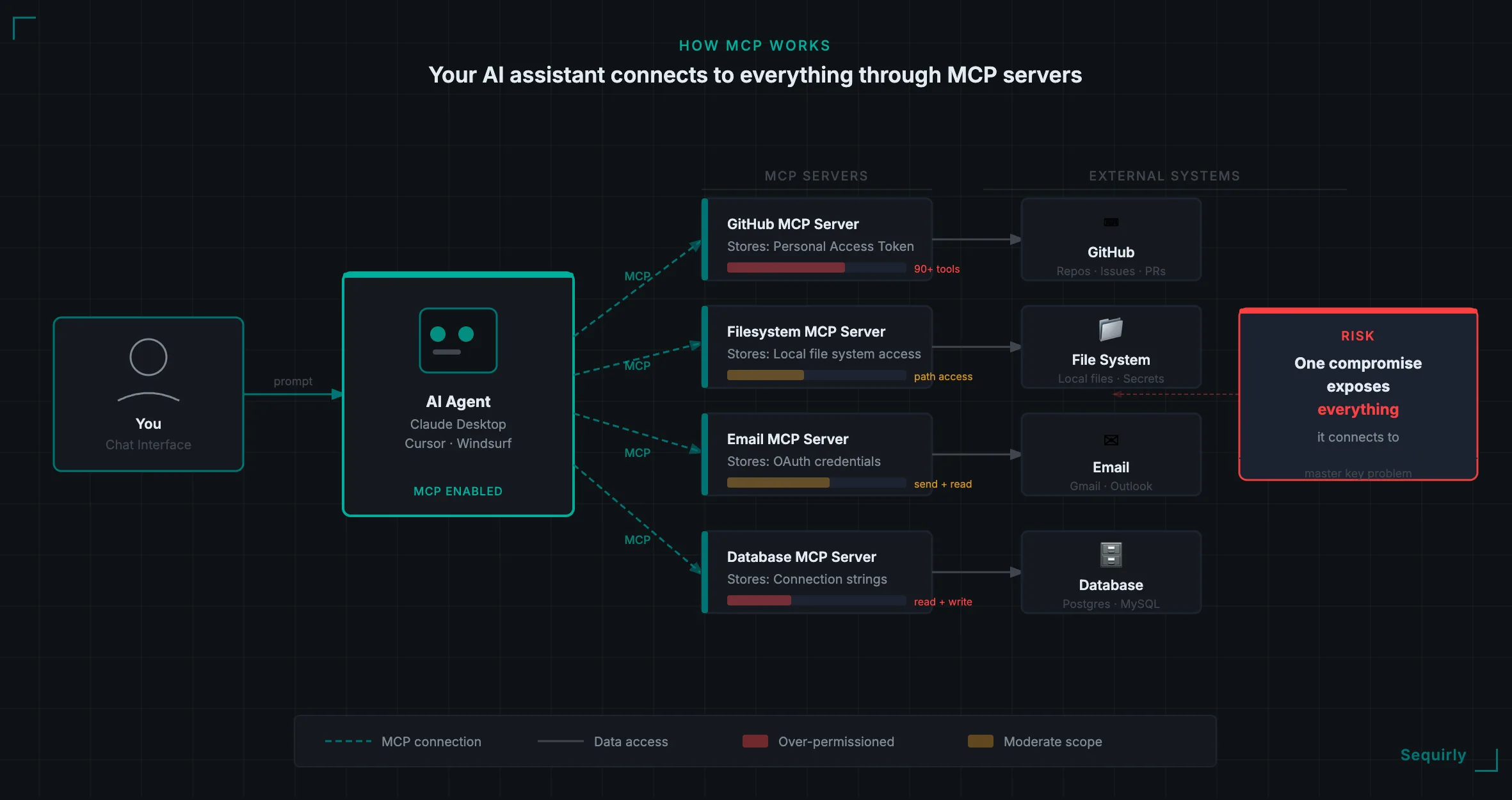
The master key problem
Every MCP server needs credentials to do its job. The GitHub MCP server stores a personal access token.
The email MCP server stores OAuth credentials. A database MCP server stores connection strings, one credential set per service, all held in the same place.
When an attacker compromises one MCP server, they don't just get that server. They get every service it holds credentials for.
A single compromise gives an attacker access to your code repositories, your email, your databases, and your cloud infrastructure at once.
Tool poisoning
MCP servers expose "tools" to your AI assistant. Each tool has a name and a description that the AI reads to understand what the tool does.
The attack: embed malicious instructions inside the tool description itself. The AI treats the description as legitimate guidance and follows it.
The user sees nothing, because tool descriptions don't appear in the chat interface.
In April 2025, Invariant Labs demonstrated this against WhatsApp's MCP integration. A poisoned tool description instructed the AI to send the user's entire WhatsApp chat history to an attacker-controlled number.
Hundreds of private messages and business conversations left the account without triggering standard data loss prevention controls.
Over-permissioning
MCP servers typically grant far more access than any specific task requires.
The official GitHub MCP server exposes over 90 tools. That includes high-risk operations: deleting files, modifying configurations, and accessing private repositories across an entire account.
When your AI assistant has access to 90 tools because you wanted it to help with one task, the damage from any mistake or attack scales accordingly.
The principle here is the same one covered in the AI Security Checklist for Teams Under 50: limit what the AI can reach, so errors stay contained.
What has actually gone wrong
These are documented incidents, not hypothetical scenarios.
GitHub MCP prompt injection (May 2025)
Invariant Labs disclosed that a malicious public GitHub issue could hijack an AI assistant's MCP session. Injected text in the issue instructed the AI to read private repositories and post their contents to a public pull request.
The exfiltrated data included internal project details and salary information.
The root cause was a personal access token with permissions across all repositories, not just the ones the agent needed. One overly broad token turned a public issue into a data leak.
Asana MCP server bug (June 2025)
Asana disclosed a bug in its MCP server feature that could allow data from one organization to be accessed by a different organization on the same platform. Based on reporting at the time, approximately 1,000 customers were affected.
Projects, tasks, and team data from one tenant were potentially visible to another.
The underlying cause was a logic flaw in access control. MCP context was not properly isolated between users.
Smithery hosting breach (October 2025)
Smithery is a platform for hosting MCP servers. Security researchers at GitGuardian found a path-traversal bug in the platform's build configuration that allowed an attacker to cause the registry to build Docker images from the server operator's home directory.
That exposed API tokens and access to more than 3,000 hosted MCP apps, along with the ability to read inbound client traffic that contained API keys from downstream services.
This is a supply chain attack. The individual teams running those apps did nothing wrong.
The platform they trusted was the vulnerability.

Prevent accidental data leaks to ChatGPT, Claude, and Gemini.
Sequirly scans your prompts and uploaded files before they're sent. If it finds credentials, client records, or API keys, it stops you before the request goes out.
How to check your team's MCP exposure
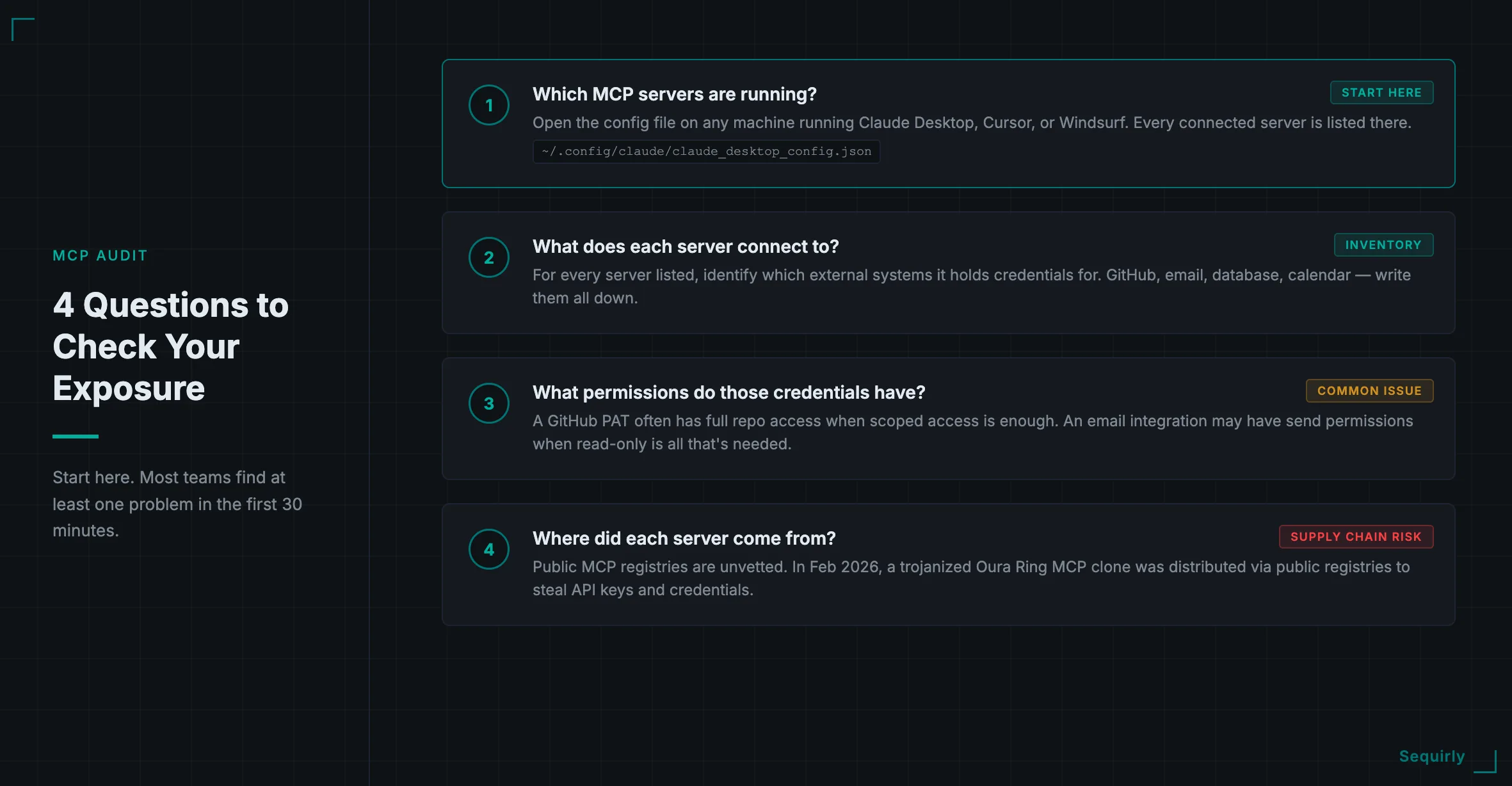
Start with four questions.
Which MCP servers are running? Tools like Claude Desktop, Cursor, and Windsurf use configuration files that list every connected MCP server. On a Mac, Claude Desktop's config is typically at `~/.config/claude/claude_desktop_config.json`.
Check this file on the machines of anyone who uses AI tools heavily.
What does each server connect to? For every MCP server listed, identify which external systems it holds credentials for. Write them down.
What permissions do those credentials have? This is where most teams find their first problem. A GitHub personal access token created for one task often has full repository access.
An email integration may have permission to send, when read-only is all the work actually requires.
Where did each server come from? MCP servers in public registries are not vetted. A server that looks legitimate may have been cloned and modified.
In February 2026, attackers cloned a legitimate Oura Ring MCP project and distributed a trojanized version through public registries, delivering malware designed to steal developer credentials, browser passwords, and API keys. Verify that every server your team uses comes from a source you can trace.
For a broader framework to audit your team's full AI security posture, AI Security for Teams: The Complete 2026 Protection Guide covers the end-to-end approach.
Five steps to reduce your MCP risk
These are ordered by impact. Work through them in sequence.
1. Audit what's running. Use the four questions above. Document every MCP server, every service it connects to, and every credential it holds.
You can't scope what you can't see.
2. Apply least privilege to every token. Replace broad credentials with scoped ones. GitHub personal access tokens should cover only the specific repositories the agent needs.
Email integrations should be read-only unless write access is required for a defined task. This single step removes the blast radius from most incidents.
3. Remove servers your team doesn't actively use. Every inactive MCP server is an attack surface with no current benefit. If no one is using it, remove it from the config.
4. Vet sources before installing. Only install MCP servers from sources your team can verify. Check the repository history, contributor list, and recent commits before trusting a community-built server.
If you can't verify the source, don't install it.
5. Enable audit logging. You need a record of which tools were called and what data was accessed. If your MCP host doesn't surface that information, that's a gap to close before something goes wrong.
The AI Security Best Practices guide covers token management and audit logging principles in more detail if you need a deeper reference.
Where to start this week
If you've never looked at your team's MCP configuration, do this first: open the config file on your own machine and list every connected server.
On Mac, Claude Desktop's config is typically at `~/.config/claude/claude_desktop_config.json`. Cursor and Windsurf have similar files.
What you find tells you whether the five steps above are urgent or routine.
Then check the same file on the machines of your most active AI users. Developers and power users tend to accumulate MCP integrations quickly without tracking what each one connects to.
If you want a broader picture of your team's AI data exposure beyond MCP, the free AI security audit at sequirly.com/tool/audit takes about five minutes and covers the most common exposure points across your full AI workflow.
The layer MCP doesn't cover
MCP governs what your AI agents can do with connected systems.
What it doesn't cover is what your team types into ChatGPT, Claude, and Gemini in the browser every day. Client data, source code, financial information, internal documents: these travel through ordinary browser prompts, not MCP servers, and they sit outside the scope of every MCP security tool currently on the market.
That's where Sequirly works. It sits between your team and AI tools in the browser, catching sensitive data before it's ever sent.
Everything runs locally. Nothing Sequirly detects reaches external servers.
The admin dashboard shows which AI tool was used, which data category was flagged, and what action was taken. Not the content of prompts.
For most teams, the browser prompt layer is where the risk begins, long before anyone thinks about MCP servers.
Join the Sequirly newsletter for ongoing coverage of AI workflow security, including emerging MCP threats as the ecosystem develops. Sign up here.