
In the last week, someone on your team almost certainly pasted something into an AI tool that shouldn't have gone there.
They're rushing through a deadline and the AI tool is already open.
If your team uses AI tools daily and you haven't built controls around that usage yet, this is the guide. It has six AI security best practices, in the order worth addressing them.
1. Know what you're protecting before you protect it
You cannot protect data you haven't classified. The first step in any AI security program isn't a tool or a policy document.
It's a list.
Sit down and answer three questions:
- What data does your team handle regularly?
- Which of that data would cause real harm if it reached an AI company's servers?
- Which workflows are most likely to bring that data into contact with AI tools?
The categories that matter most for most growing teams:
- Client PII (names, emails, addresses, financial records)
- Internal business data (pricing models, strategy documents, unreleased products)
- Credentials and API keys (anything that grants access to systems)
- Legal and compliance documents (contracts, regulatory filings, attorney communications)
A useful exercise: _map your data categories against the workflows most likely to expose them. A client services team summarizing meeting notes is a different risk profile than a dev team debugging code. Both are the same AI tool with very different data on the line._
The table below gives you a starting framework. Adjust it to your team's actual work.
| Data category | Highest-risk AI workflow | Why |
|---|---|---|
| Client PII | Summarizing emails or CRM data | Often pasted in bulk for speed |
| Internal strategy | Drafting reports or decks | Context-setting prompts include sensitive framing |
| Credentials | Debugging code with AI assistance | API keys appear inline in environment configs |
| Legal documents | Summarizing contracts for non-legal stakeholders | Full documents get uploaded as attachments |
Once you know what's sensitive for your team specifically, you can write rules around it. Without that inventory, any policy you write will be too vague to follow and too broad to enforce.
2. Write an AI usage policy people will actually follow
The biggest problem with most AI policies is that they are easy to be ignored.
- A policy buried in a shared drive folder is most likely written by a legal team in three pages. It will be referenced during onboarding and never again. That's just a liability, not a policy.
- A policy that works has three properties: specific enough to be actionable, short enough to remember, and tied to real examples from your actual workflows.
Specific looks like this.
"ChatGPT Team plan or higher, Claude Pro, and Gemini Workspace are approved. Personal accounts are not permitted for work tasks. No client data, credentials, or internal financials go into any AI prompt without approval from your team lead."
Short means shareable.
If you can't drop your key AI rules into a Slack message and have a new hire understand them, the policy is too long. Two paragraphs and a list of approved tools is enough to start.
Real examples create memory.
"Don't paste client data" lands differently when followed by: "That includes forwarding a client email thread into ChatGPT to summarize it, uploading a CSV of leads into any AI tool, or copying a contract into Claude to pull out key dates."
For a step-by-step framework on building a policy from scratch, see AI Governance for Teams: Build a Policy That Actually Works.
3. Control which AI tools your team uses
Your team is using more AI tools than you know about.
A Gartner survey from late 2025 found 57% of employees use personal GenAI accounts for work and 33% admit inputting sensitive information into unapproved tools. The tools you've approved aren't the only ones running.
Build a tiered list.
Tier 1 (approved):
- Tools with enterprise data agreements where your team's data won't be used for model training and is protected by contract.
- ChatGPT Team or Enterprise, Claude for Work, Gemini Workspace, and Microsoft Copilot within your tenant all qualify at the right subscription level.
Tier 2 (case by case):
- Tools that require individual review before your team uses them for work.
- Most new AI products belong here by default until you've checked their data handling policies.
Tier 3 (not permitted):
- Consumer AI tools accessed through personal accounts.
- Data handling on free or personal tiers is subject to training by default, and you have no contractual protection.
A quick reference for the three major tools:
| Tool | Personal/Free tier | Team/Pro tier | Enterprise tier |
|---|---|---|---|
| ChatGPT | Trains on your data by default | No training on your data | Full DPA, SSO, audit logs |
| Claude | Trains on your data by default | No training on your data | Full DPA, admin controls |
| Gemini | Trains on your data by default | No training with Workspace | Full DPA, compliance controls |
The enforcement problem.
You cannot block AI tools effectively with a firewall or a ban.
83% of organizations lack automated controls to prevent sensitive data from entering public AI tools, and most hard blocks just push usage to personal devices where you have even less visibility.
What works better: a clear approved list with reasons, a simple process for requesting new tools before using them, and monitoring at the browser layer.
For a deeper look at how data loss prevention fits into tool governance, see AI Data Loss Prevention (DLP): What It Is and Why Your Team Needs It.

Prevent accidental data leaks to ChatGPT, Claude, and Gemini.
Sequirly scans your prompts and uploaded files before they're sent. If it finds credentials, client records, or API keys, it stops you before the request goes out.
4. Secure the browser layer
The browser is where AI data actually moves. Your team opens ChatGPT, pastes a prompt, and hits send.
That moment is the gap that most security setups miss entirely.
Network-level controls can tell you a request went to chatgpt.com. They cannot read what was in the request. Traditional DLP tools do not inspect HTTPS traffic to a web app. By the time the data reaches OpenAI's servers, there is no recall.
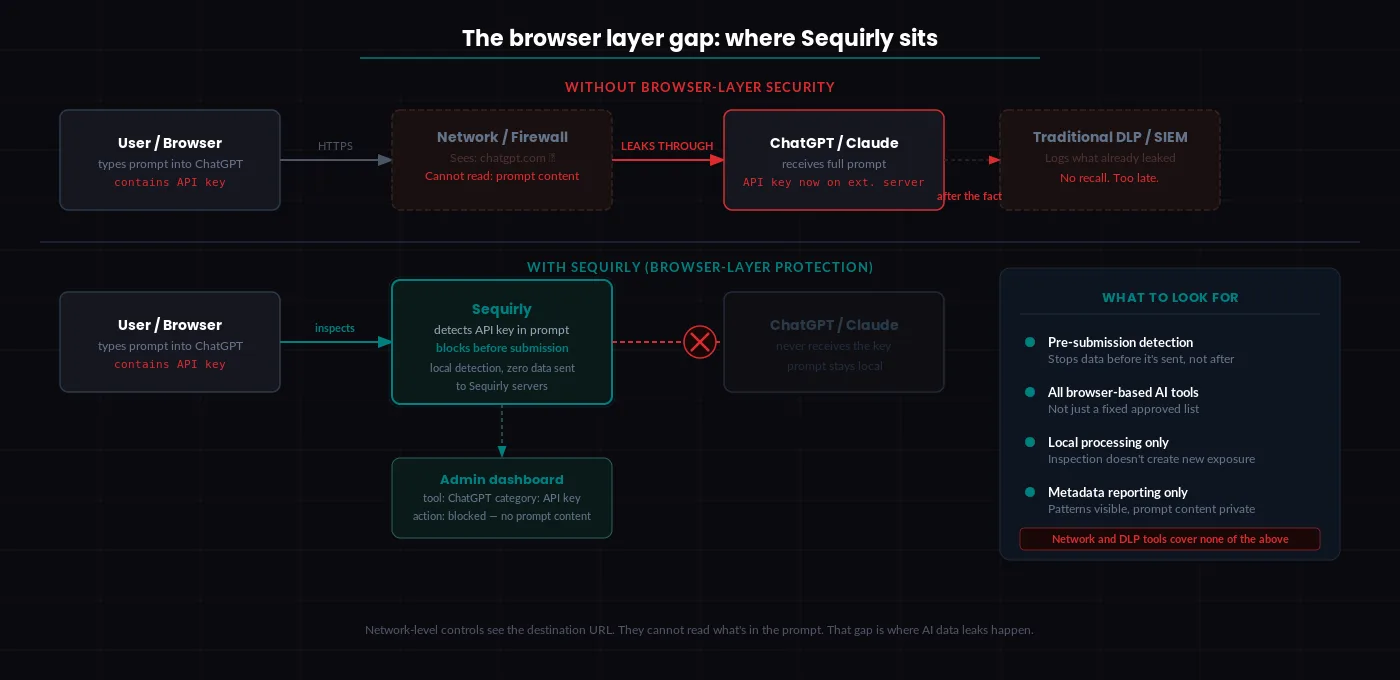
What browser-level AI security looks like.
Browser-level security tools sit between your team member and the AI tool and inspect what's being sent before it leaves the browser. They work at the moment of submission, not after the fact.
When evaluating tools in this category, look for four things:
- Pre-submission detection (stops data before it's sent, not after)
- Coverage across all browser-based AI tools, not just a fixed approved list
- Local processing so the inspection itself doesn't create a new exposure point
- Admin metadata reporting that shows patterns without recording full prompt content
Sequirly works at the browser layer. It catches sensitive data before a prompt is submitted, runs all detection locally on the device, and gives admins visibility into which tool, which data category, and what action was taken, without storing the content of prompts.
For how browser-level protection fits into a broader security architecture, see AI Workflow Security.
5. Build behavioral training, not checkbox training
Annual security awareness training does not change behavior.
Gartner's 2026 security guidance explicitly recommends shifting from general awareness programs to adaptive behavioral training that includes AI-specific tasks.
The distinction matters because knowing something is risky and knowing what to do differently in the moment are two different skills.
Awareness training tells your team that pasting client data into ChatGPT is a security risk. They acknowledge it. They move on. Three days later, they have a deadline and the approved process is two more steps than the fast path.
Behavioral training puts your team in the actual situation. Here's a client email with payment data attached. You need to summarize it for a meeting in ten minutes. What do you do?
Then it shows the right answer. And it stays brief enough to actually be remembered.
A real example: instead of a training module on AI data security, send a Slack message once a month with a scenario your team would actually face. "Someone on your team wants to use Claude to draft a proposal for a client. The brief includes the client's budget. What should they do before they paste it in?" Then give the answer and the reasoning in three sentences.
What actually works:
6. Monitor AI usage continuously
You can't manage what you don't have visibility into. Most growing teams have no visibility at all.
Watch for patterns: which tools your team is actually using day-to-day, which data categories are showing up in AI interactions, and whether your approved tool list is being followed in practice.
Minimum viable monitoring for a 20-person team.
Start with the enterprise tiers of your approved tools. ChatGPT Team, Claude for Work, and Gemini Workspace all include basic sign-in tracking and usage logs. Turn those on. Review them.
Add browser-level reporting to see which AI tools are being accessed from company devices, including tools not on your approved list.
Set a 30-minute monthly review with your team lead. Look at which tools are showing up, which workflows are generating the most AI activity, and whether anything unexpected appeared.
What you're watching for:
- AI tools appearing in browser reports that aren't on your tier list
- Spikes in AI usage that suggest a new workflow you don't know about yet
- Usage patterns from people whose roles don't obviously require a particular tool
That's it. The goal is visibility into what your team is doing so you can make informed decisions about where the risk is.
For a complete view of how AI security monitoring fits into your overall security architecture, see AI Security for Teams: The Complete 2026 Protection Guide.
Start with a free AI security audit
Before you build anything, it helps to know where you actually stand.
The Sequirly AI Security Audit Tool takes about five minutes and gives you a clear baseline: which AI tools your team is exposed to, which data categories are at risk, and which of the six practices above you're already covering.
If you want to see browser-level protection working in practice, book a demo or try Sequirly free. No IT department required.