

Knowing your team uses AI tools is not the same as knowing what they share.
Most managers can name the tools. Very few know what data has passed through them.
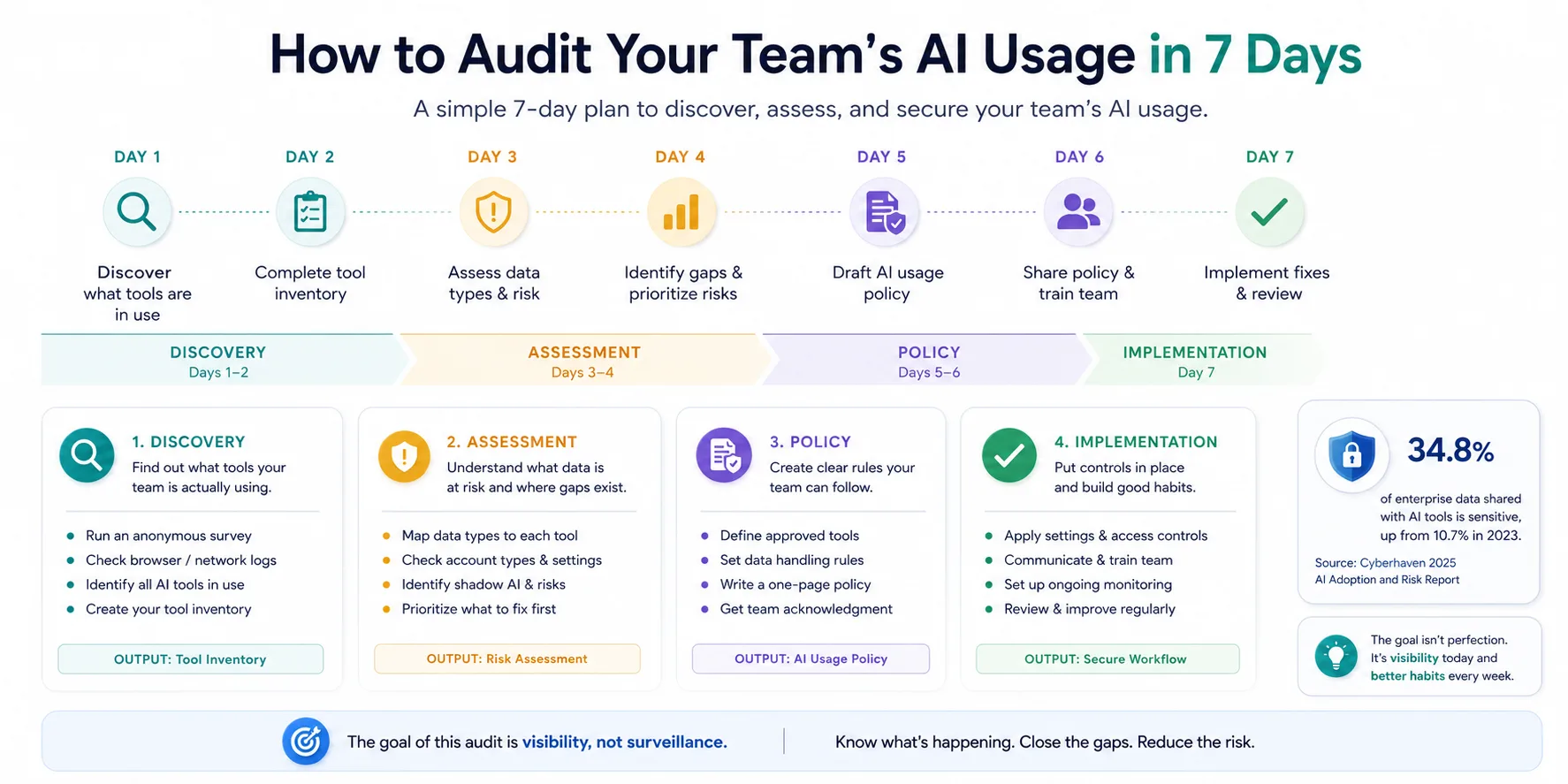
This 7-day AI security audit gives you the plan for closing that gap: discovery on Days 1 and 2, risk assessment on Days 3 and 4, policy on Days 5 and 6, and a working fix by Day 7.
If your team uses AI regularly and you have never run a formal audit, start here.
What This Audit Actually Covers
An AI usage audit is not a surveillance exercise. You are not trying to catch anyone doing something wrong.
The goal is visibility. You need to understand which tools exist, what data flows through them, and whether your team has any guardrails in place.
The risk is almost always accidental. Your team uses AI tools to get work done. The tools are just designed to make it easy to paste anything into a prompt without pausing to think about what happens to it next.
The audit gives you the map. Then you can build the controls.
Days 1-2: Discovery
What tools is your team actually using?
This is the hardest step to get right because people underreport.
If you ask "what AI tools are you using?", you get the approved list. If you ask "what tools help you work faster right now?", you get the real answer.
Run both approaches in parallel.
The survey
Send a short survey, five questions, anonymous. Ask:
- What AI tools do you use in an average week?
- What do you use them for? (Drafting, summarizing, coding, research, other?)
- Are you using a personal account, a work account, or both?
- What is the single most time-consuming task AI helps you with?
- Have you ever shared client data, source code, or internal documents with an AI tool?
The network check
While the survey runs, pull browser history logs or network traffic data for AI-related domains. Work with your IT contact if you have one, or do it yourself if you manage your own tools.
You are looking for traffic to:
- chat.openai.com
- claude.ai
- gemini.google.com
- perplexity.ai
- copilot.microsoft.com
- Any AI coding tools (GitHub Copilot, Cursor, Replit, Codeium)
This tells you what is actually in use, not just what people remember to mention. There will be tools in the traffic data that do not appear in the survey. That gap is your shadow AI problem.
For a deeper framework on identifying shadow AI across your team, see Shadow AI in Teams: How to Find It, Measure It, and Fix It.
Day 2 output: your tool inventory
By the end of Day 2, you should have a working inventory:
| Tool | Uses | Account type | Primary use case |
|---|---|---|---|
| ChatGPT | 5 people | Mix of personal and work | Writing, research |
| Claude | 2 people | Personal | Coding, drafting |
| Gemini | 1 person | Work (Google Workspace) | Summarizing |
This is your baseline. Every other step in the audit builds from this.
Days 3-4: Assessment
What data is actually at risk?
Now that you know which tools exist, you need to understand what data is flowing through them.
This is where the audit shifts from theoretical to uncomfortable. The tools you found in Days 1 and 2 are not inherently dangerous. What matters is the combination of what your team puts into them and how much control you have over those accounts.
Map the data types to the tools
For each tool in your inventory, work through the use cases your team named in the survey. Then ask: what data would be involved in that task?
A few examples:
- Writing client proposals: client names, project scope, budget, sometimes confidential strategy
- Summarizing meeting notes: could include financial data, personnel discussions, unreleased product plans
- Debugging code: developers sometimes paste environment variables, API keys, database connections
- Drafting emails: client contact lists, deal terms, internal pricing
Check the account types
The account type matters as much as the tool.
A team member on ChatGPT Team with training opt-out enabled is in a different position from someone on a free personal account. On the free tier, OpenAI's default is to use conversations for model training unless the user manually disables it.
Cyberhaven's data shows that 32.3% of ChatGPT usage happens through personal accounts. If you found personal accounts in your Day 2 inventory, that is your first item to address.
For a breakdown of how each major AI tool handles your data by default, see ChatGPT vs Claude vs Gemini: Which AI Tool Is Safest?.
Build your risk matrix
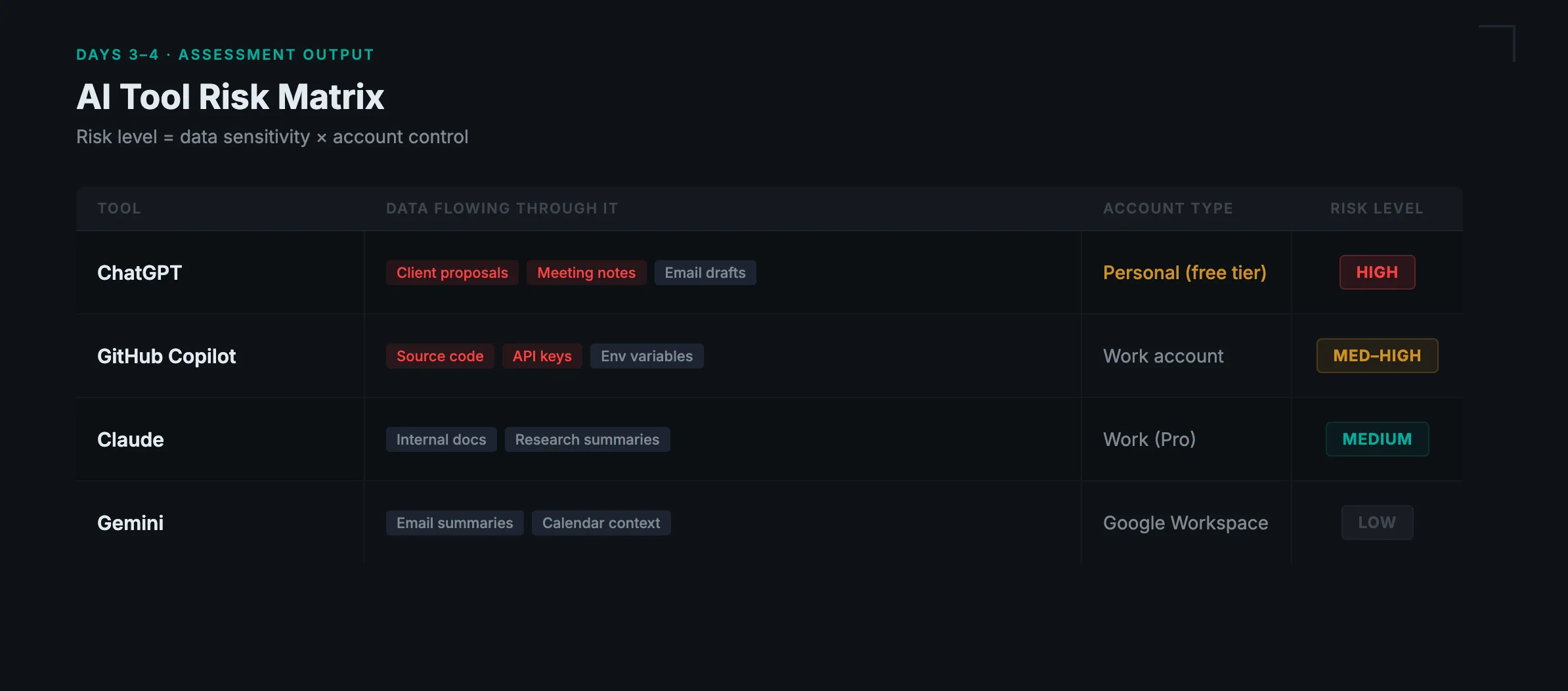
At the end of Day 4, you should have a simple risk matrix:
| Tool | Data flowing through it | Account type | Risk level |
|---|---|---|---|
| ChatGPT | Client proposals, meeting notes | Personal (free) | High |
| Claude | Internal documents | Work (Pro) | Medium |
| GitHub Copilot | Source code, env variables | Work | Medium-High |
Risk level is about the combination of data sensitivity and account control.

Prevent accidental data leaks to ChatGPT, Claude, and Gemini.
Sequirly scans your prompts and uploaded files before they're sent. If it finds credentials, client records, or API keys, it stops you before the request goes out.
Days 5-6: Policy
What rules does your team actually need?
A policy that lives in a shared drive and never gets read is not a policy.
The goal on Days 5 and 6 is to write rules that are specific enough to follow and simple enough to remember. For a complete step-by-step guide to building an AI policy for your team, see AI Governance for Teams: Build a Policy That Actually Works.
What a working AI policy covers
Based on your risk matrix from Days 3 and 4, your policy needs to answer four questions:
1. Which tools are approved?
Not, "AI tools are permitted."
Instead: "ChatGPT Team plan, Claude Pro, and Google Gemini via your Workspace account are approved. Personal accounts are not approved for work use."
Be specific. If the rule is vague, people will interpret it in the way that is most convenient for them.
2. What data cannot go into AI tools?
Define what is off-limits. Starting points:
- Client PII (names, contact details, addresses, financial details)
- Credentials and API keys
- Financial data (pricing, contracts, revenue)
- Confidential strategy or unreleased product information
- Anything covered by a client NDA
3. Who owns tool approvals?
Someone needs to own this. If it is "everyone's responsibility," it is no one's responsibility.
Pick one person or role and all new tools go through them before anyone uses them for work.
4. What happens when someone makes a mistake?
This section matters more than most policies include. If someone accidentally pastes client data into a personal ChatGPT account, what do they do?
The answer should be: report it immediately to someone, who will assess what was shared and whether the client needs to be notified.
The goal is to make reporting feel safe, not punishable. If people fear the consequences, they will hide mistakes.
Day 7: Implementation
Make the fix stick.
Policies do not prevent leaks on their own.
On Day 7, you are converting the decisions from Days 5 and 6 into actual changes.
Switch personal accounts to work accounts.
For every high-risk item in your risk matrix where someone is using a personal free account, get them onto an approved plan. This is the highest-return action in the entire audit.
Turn off training on approved accounts.
- On ChatGPT Team and Pro plans, go to Settings and confirm the training opt-out is active.
- On Claude Pro, data is not used for training by default.
- On Gemini Workspace, check your admin console.
Communicate the policy.
Send a short, direct note to your team. One paragraph naming the approved tools, one short list of what data stays out of AI tools, and one sentence on who to contact with questions.
Add it to onboarding.
Any new team member should receive the AI policy in their first week. If you have a Notion wiki or a shared onboarding doc, add a section.
Set a review date.
AI tools change fast. Put a calendar reminder for 90 days from now to review whether anything significant has changed.
For a more detailed look at what good AI workflow security looks like day-to-day, see AI Workflow Security: How to Keep Your Team Safe Without Slowing Down.
The gap policy and settings cannot close
Most Day 7 implementations cover policy and account settings. You also need to address the gap those two things cannot close on their own.
Your team will forget. Not because they are careless, but because they are under deadline pressure and moving fast. Someone will paste something they should not.
Account settings address the training question. They do not stop data from leaving the browser in the first place.
That is the gap browser-level tools like Sequirly address. Sequirly sits between your browser and the AI tool, catching sensitive data before it is submitted. Everything runs locally. As an admin you see metadata only: which tool, which data category, what action was taken. Not the content of the prompt.
It takes two minutes to install and works alongside the policy you built on Days 5 and 6.
If you want to see where your team stands before you start the audit, the free AI security audit tool gives you a read on your current exposure in about five minutes.
Where to Start
If seven days feels like a lot, start with one hour.
Take the survey questions from Day 1 and send them today. While you wait for responses, pull network traffic or browser history for AI domains.
When you have both, you will know exactly where your audit needs to focus. Most teams find one or two high-risk tools that are responsible for most of the exposure.
Fix those first.
For the full picture of how AI security works across a growing team, AI Security for Teams: The Complete 2026 Protection Guide covers what an audit alone cannot address.
The audit does not end anything. It tells you what you are actually dealing with, which is where the real work starts.