
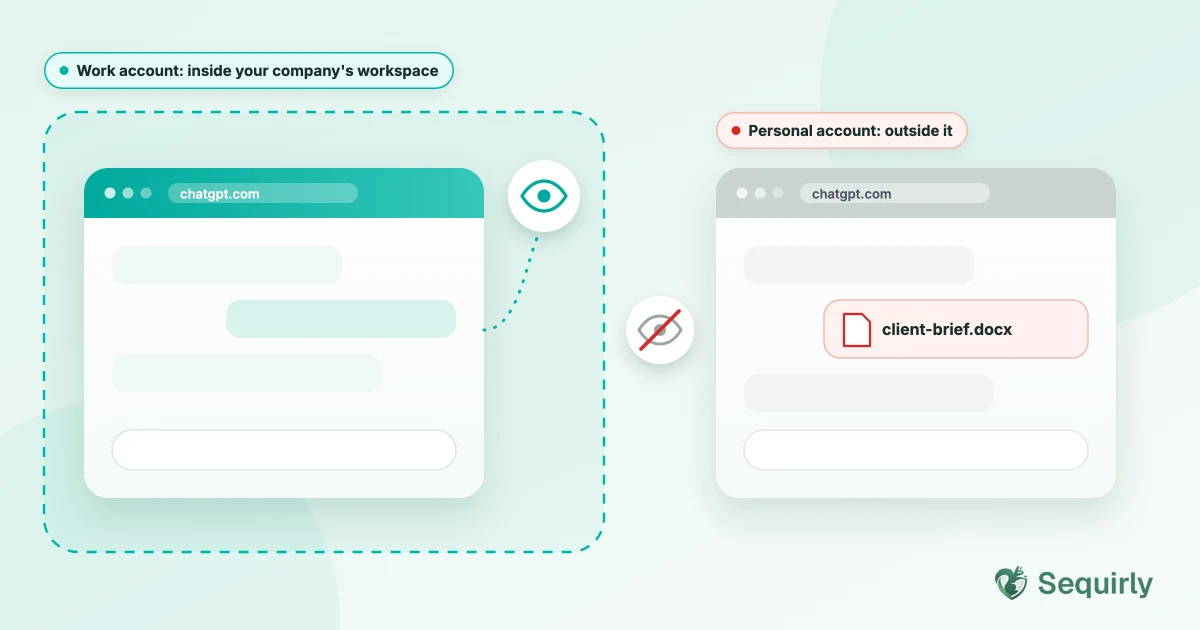
Your company can see a lot on a work ChatGPT account and very little on a personal one. That gap is where most of the risk sits, because people use the personal account for work anyway.
You can see it in the data. Harmonic Security analyzed nearly 2 million minutes of AI activity across a panel of enterprise organizations. About two-thirds of the activity on personal-tier accounts turned out to be business use. That's work, happening in the one place the company can't see.
If you're the employee, this probably feels like a harmless shortcut. However, if you run the company, it's the thing that keeps you up at night.
Here's what each type of account lets your company see, and what it doesn't.
What your company can see on a work account
A work account lives inside a workspace your company controls. That's what gives admins their visibility.
OpenAI says its compliance tools are available to ChatGPT Enterprise and Edu workspaces.
Admins get a workspace-scoped key, and only a workspace owner can grant access to conversation content. The records include:
- Timestamped conversations
- Uploaded files
- GPT settings
- Memories
- The list of workspace users
What admins see on other business plans depends on the plan. Check your admin documentation before you promise anyone anything.
Work plans also change what happens to your data. Business and Enterprise plans switch training off by default, and that's backed by contract.
What your company can see on a personal account
Through OpenAI, almost nothing. A personal account sits outside your company's workspace, so the admin tools above don't reach it.
That sounds like privacy for the employee. For the company, it means three things disappear at once.
- There's no list of who is using a personal account for work.
- There's no audit log, and no way to delete anything.
- There's no contract keeping the chats out of training. On Free and Plus, your chats can be used for training unless you turn it off.
So the company can't see the data, can't control it, and can't undo any leaks.
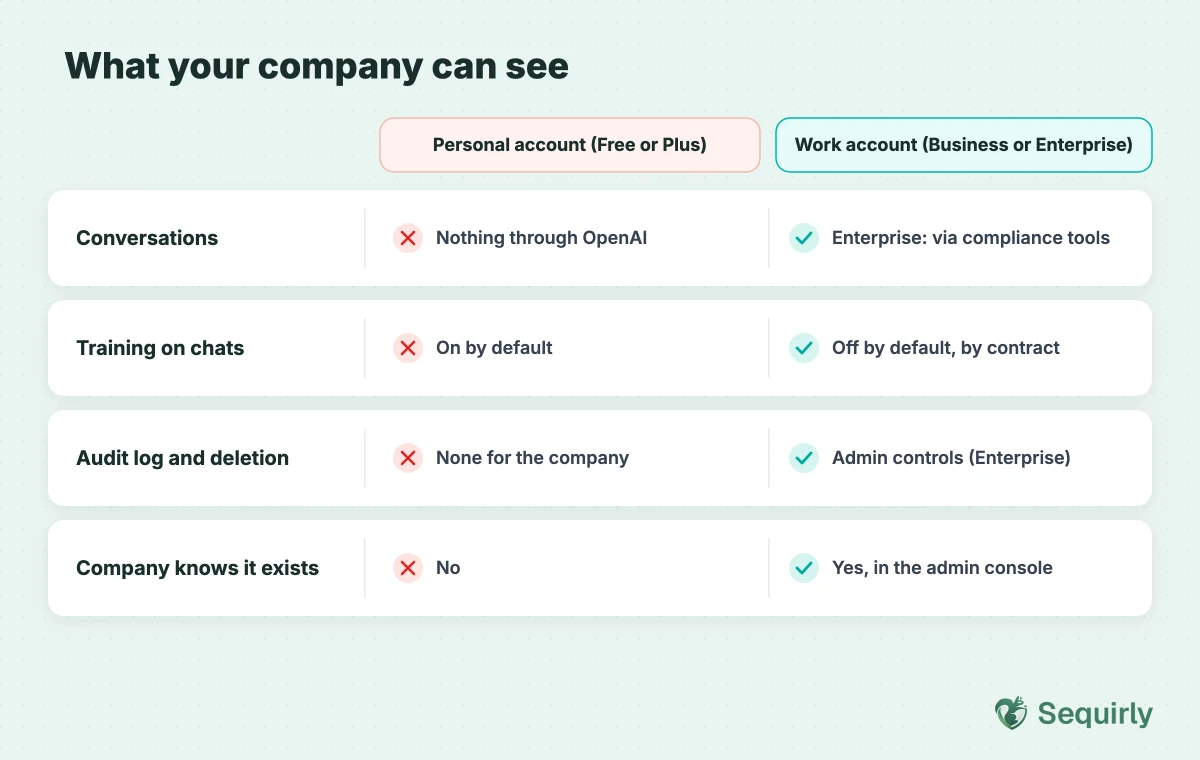
| Personal account (Free or Plus) | Work account (Business or Enterprise) | |
|---|---|---|
| Who controls the account | The employee | The company |
| Conversation visibility for the company | None through OpenAI | Enterprise: admins can access logs through OpenAI's compliance tools. Other plans: depends on the plan |
| Training on chats | On by default unless the user opts out | Off by default, by contract |
| Audit trail and deletion | None for the company | Admin controls and audit logs (Enterprise) |
| Company knows it exists | No | Yes, it's in the admin console |
What your company can still see on a personal account
There's one more layer, and people forget it.
OpenAI isn't the only place your company can look. If it manages your laptop or your browser, it may be able to see or block what you paste into a personal account too.
Microsoft's own documentation describes endpoint DLP policies that warn people, or block them, when they share sensitive data with third-party AI sites.
Whether that applies to you depends on the tools your company runs. It has nothing to do with which account you use.

Prevent accidental data leaks to ChatGPT, Claude, and Gemini.
Sequirly scans your prompts and uploaded files before they're sent. If it finds credentials, client records, or API keys, it stops you before the request goes out.
Why do people use the personal account anyway?
Honestly, I get it. It's already logged in, it's free, and nobody asked them to switch.
Harmonic's data shows how common it is. Business work made up 71.2% of ChatGPT Plus activity and 60.6% of ChatGPT Free activity on personal accounts. Claude Pro was higher still, at 75.5%.
Nobody is trying to hide anything. They're just trying to finish the task in front of them.
If you run the team
Banning personal accounts doesn't work, because the personal account is one tab away. Instead, what works is making the safe path easier than the risky one.
That last step is what Sequirly does. It checks what you're about to send to ChatGPT, Claude or Gemini, and warns you before sensitive data leaves your browser.
Sequirly shows admins which AI tools are being used in the browser, but it has limits too. It doesn't cover desktop AI apps. It also can't see browsers where the extension isn't installed, such as Firefox or Safari.
If you're the employee
You don't have to stop using AI. You just have to be careful about what goes into a personal account.
- Keep client data, credentials and anything under NDA out of it.
- Turn off training in Settings if you use it for anything work-related.
- If something sensitive already went in, tell your team lead. Here's what to do about an API key if that's what it was.
Common Questions
Can my employer see my personal ChatGPT conversations?
Not through OpenAI. A personal account sits outside your company's workspace. But if your company manages your device or browser, it may be able to see activity there, whichever account you use.
Can my employer see my work ChatGPT account?
On Enterprise, admins can access conversation logs through OpenAI's compliance tools. What admins see on other business plans depends on the plan, so check your admin documentation.
Is it safe to use a personal ChatGPT account for work?
Not for client data, credentials or anything under NDA. Free and Plus can use your chats for training unless you turn it off, and your company has no control over retention or deletion.
Does a company ChatGPT plan stop people from using personal accounts?
No. It gives people a safe default, but anyone can still open a personal account in another tab.
How do I find out whether my team uses personal accounts?
Ask your team directly, without blame, and scan an exported chat history with a free scanner. The scanner runs in your browser, so nothing is uploaded.
Where to start
Find out what's already in there. Scan your ChatGPT history, or ask your team to scan theirs.
Then try Sequirly free so the paste gets checked on every account, personal or work.