
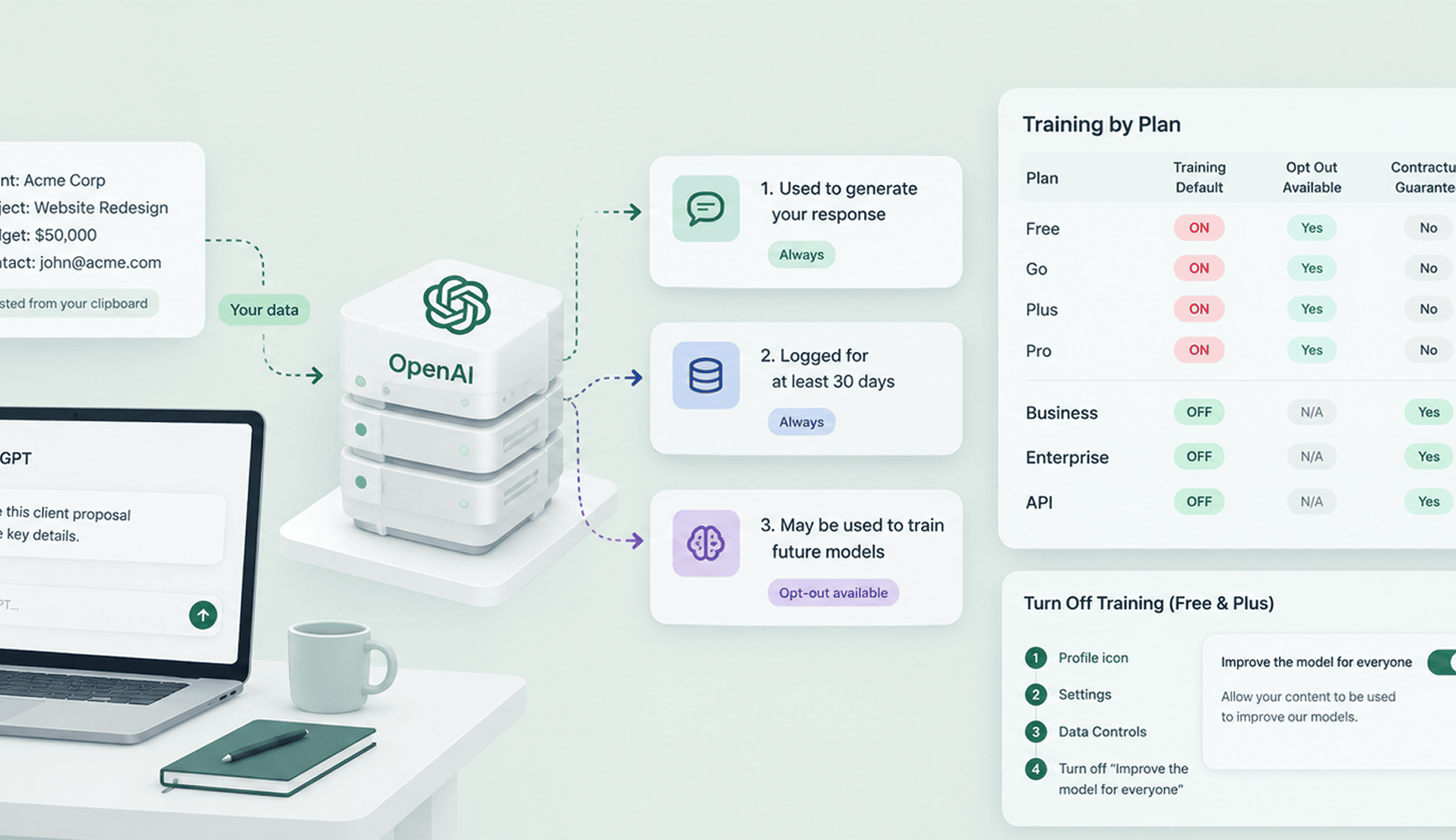
The short answer: yes, unless you're on a paid business plan or have manually opted out.
But training is one of three things that happen when you paste into ChatGPT. The other two happen on every plan, including Enterprise.
If you're on Free or Plus and haven't touched your settings, your conversations are feeding OpenAI's training pipeline right now. Here's what's actually happening, and what to do about it.
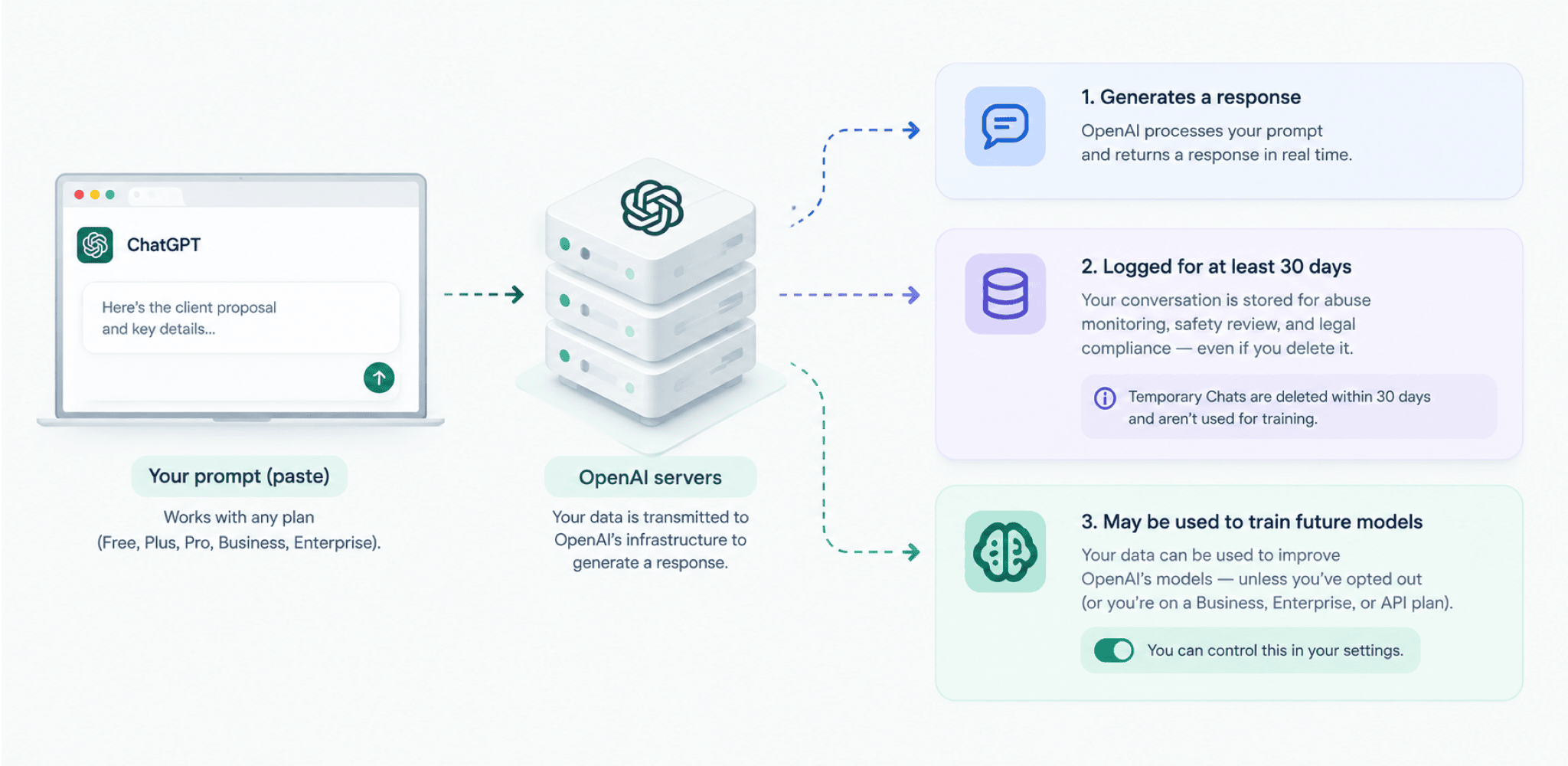
Three Things That Happen to Every Prompt
Currently, you are so focused on training, but here's the full picture of what OpenAI actually does with what you send:
1. Your prompt reaches OpenAI's servers.
Everything you shared with ChatGPT is transmitted to OpenAI's infrastructure to generate a response. This happens irrespective of the plan you have selected, including Enterprise.
2. It gets logged for at least 30 days.
OpenAI retains conversation data for abuse monitoring, safety review, and legal compliance, even if you delete the conversation.
Temporary Chats are deleted within 30 days and aren't used for training, but they still exist in that window.
3. It may be used to train future models.
This is the one you can actually control.
Does ChatGPT Train on Your Data? What Each Plan Does
This is what the pricing page doesn't make obvious:
| Plan | Training default | You can opt out | Contractual guarantee |
|---|---|---|---|
| Free | ON | Yes | No |
| Go | ON | Yes | No |
| Plus | ON | Yes | No |
| Pro | ON | Yes | No |
| Business (formerly Team $20/seat/mo) | OFF | N/A | Yes |
| Enterprise (custom pricing) | OFF | N/A | Yes |
| API (developer platform) | OFF | N/A | Yes |
Even after paying $20/month for Plus, you are not opted out of training. You're still opted in by default until you change it manually yourself.
How to Turn Off Training (Free and Plus Users)
Stop right now, open your ChatGPT account, and do this before you complete reading this blog. It only takes 30 seconds.
The change applies immediately and syncs across web and mobile. However, it only affects conversations going forward, not your existing history.
What Happens to Data Already Used for Training? Can You Undo It?
OpenAI's own help center says turning off training only stops your future conversations from being used to train its models.
There is nothing you can do for conversations that were already there.
And it's not even OpenAI's fault. Machine unlearning, the field trying to solve exactly this problem, hasn't solved it yet.
An NYU professor put it plainly to Fortune: "The only reliable way to pull specific data back out of a trained model is to retrain the whole thing from scratch. That costs tens of millions of dollars for a model like GPT. Nobody does that because one person shared something that shouldn't be sent to an external server."
OpenAI's right to be forgotten process draws the same line.
It can stop your personal information from surfacing in future ChatGPT responses. But it doesn't reach into the model and remove what it already learned.
So if you're reading this because you already pasted something you regret, here's the honest answer. Turning off training protects what you send next; it does nothing for what you already sent.
Start by finding out what's in there. Scan your ChatGPT export. It's free, and nothing leaves your browser. If it was an API key, here's what to do in the first hour.
You need to think about catching sensitive data before it leaves your browser, instead of hoping to undo it after.
What "No Training" Still Doesn't Cover
Being on Business or Enterprise, or opting out on Plus, means your data isn't added to OpenAI's training set.
Your data still reaches OpenAI.
Every prompt travels to OpenAI's servers to generate a response. That happens before any training decision.
In March 2023, a caching bug let some ChatGPT users see titles from a stranger's chat history. For a nine-hour window, it also exposed the names, emails, and partial payment details of 1.2% of Plus subscribers to other users, OpenAI confirmed in its own postmortem.
This bug wasn't caused because of training setting or the selected plan. The data already existed on OpenAI's servers, and a bug reached it.
Most teams hear "we're on Enterprise, training is off" and consider the question settled.

Prevent accidental data leaks to ChatGPT, Claude, and Gemini.
Sequirly scans your prompts and uploaded files before they're sent. If it finds credentials, client records, or API keys, it stops you before the request goes out.
The Personal Account Problem
For most businesses, employees using personal accounts matters more than training settings.
According to Cyberhaven's 2026 report, 32.3% of ChatGPT usage at work happens through personal accounts. That's roughly one session in three with no enterprise retention policies, no admin visibility and no training protections.
Your company might pay for ChatGPT Business for official use. If someone logs into their personal Gmail account to "quickly try something," all of your entire security checklist disappears.
In 2023, Samsung engineers pasted proprietary semiconductor code and internal meeting transcripts into ChatGPT, according to reports at the time. Samsung banned ChatGPT company-wide shortly after. As you can see, the plan settings weren't the failure point here.
Source code and meeting transcripts are just two entries on a longer list. See 5 Types of Sensitive Data Your Team Is Accidentally Sending to ChatGPT for the rest.
And, for more on documented incidents like this, see 5 Real ChatGPT Data Leaks That Cost Companies Millions.
Does ChatGPT Sell Your Data?
No. OpenAI's revenue comes from subscriptions and API usage fees, not from selling user information to third parties.
Training on your data and selling it are different things. Your conversations stay with OpenAI and improve their own models. They're not handed to advertisers or external companies for commercial use.
There's a newer wrinkle worth knowing about, though. OpenAI started showing ads inside ChatGPT in January 2026, on the Free and Go plans. Plus, Pro, Business, Enterprise, and Edu accounts don't see them.
Those ads get personalized using your current chat thread, your past chats, your memory, and how you've interacted with ads before.
You can turn most of that off in Settings under Ad Controls. But even with personalization off, OpenAI still uses your current conversation to pick the ad you see.
There's no setting that removes your prompt from the equation entirely, only the part that reaches across sessions.
Even with all that, OpenAI draws a specific line. Advertisers see performance numbers, clicks, and views, not your actual conversations, chat history, or personal details.
So to answer your question, OpenAI doesn't sell your conversations to advertisers. But on a free account, your conversations are now doing two jobs at once.
- Training the model, unless you've opted out.
- And quietly shaping which ad shows up next, unless you've opted out of that too.
That said, whether your data enters a training pipeline, gets used to personalize an ad, or sits in a 30-day log, it has left your control. The practical exposure is the same either way.
Common Questions
Does ChatGPT Plus train on your data?
Yes, by default. Plus doesn't opt you out, so you need to turn off "Improve the model for everyone" yourself in Settings → Data Controls.
Does ChatGPT Business (formerly Team) train on your data?
No, not by default, and that's backed by contract. OpenAI renamed the Team plan to Business in August 2025.
Does ChatGPT Enterprise train on your data?
No, not by default, and that's backed by contract. But your prompts still reach OpenAI's servers and are logged for about 30 days.
Does ChatGPT retain data after I delete a conversation?
Yes, for up to 30 days for abuse monitoring. This applies to all plans.
If there's an active legal preservation order, as happened during OpenAI's 2025 litigation, retention periods can be extended regardless of your settings.
Is Plus safer than the free plan for business use?
No, if you are asking solely in terms of privacy defaults. Plus gives you more features, but the actual privacy upgrade is Business or Enterprise.
Can my employer see what I type into ChatGPT?
No, if you are on a personal plan.
On Business or Enterprise through your company's tenant, admins can access conversation metadata and may have access to logs. Check your company's internal AI policy.
New to ChatGPT? Start Here Before You Type Anything
Maybe you're deciding whether to use ChatGPT at all, for yourself or for the people you manage.
Start with what you'll actually use it for.
- If it's personal writing or brainstorming, nothing that touches a client's name or code you don't own, Free or Plus works fine. Just turn off training in Settings before your first real conversation, not after.
- If you're bringing it into a business, even a two-person one, skip Free and Plus entirely and go straight to Business. The extra cost buys you training off by default, an admin console, and a contract that says so, instead of a checkbox you have to remember to uncheck yourself.
Before anyone on your team pastes their first client email into it, write down what's off-limits, what data can go in, what can't, and who owns the account.
ChatGPT vs Claude vs Gemini breaks down what each one actually does with your data, not just what they're good at writing. It's worth comparing before you commit to one tool.
Already Using ChatGPT at Work? Here's Where to Start
For the full setup walkthrough, see Before Your Team Uses ChatGPT: The 5-Minute Security Setup.
Training settings are one piece. What your team is sending before it reaches OpenAI is the harder question, and it's the problem DLP tools built for AI platforms are meant to solve.
If you want to catch sensitive data before it leaves the browser, across ChatGPT, Claude, Gemini, and every other AI tool your team uses, try Sequirly for free. It runs locally, blocks data before sending, and takes two minutes to install.